
By Yannick Lacroix
In 2024, Library and Archives Canada (LAC) launched Track my archival order (TMAO)—an online feature that allows you to track the status of your archival consultation orders at 395 Wellington Street, Ottawa. Currently only available at LAC’s Ottawa location, this feature offers real-time updates and details on your orders, providing greater autonomy and convenience as part of our ongoing commitment to improving your overall online experience.
How to use Track my archival order
To use TMAO, you need to register for a My account or sign into your existing one. Ensure you have a valid user card.
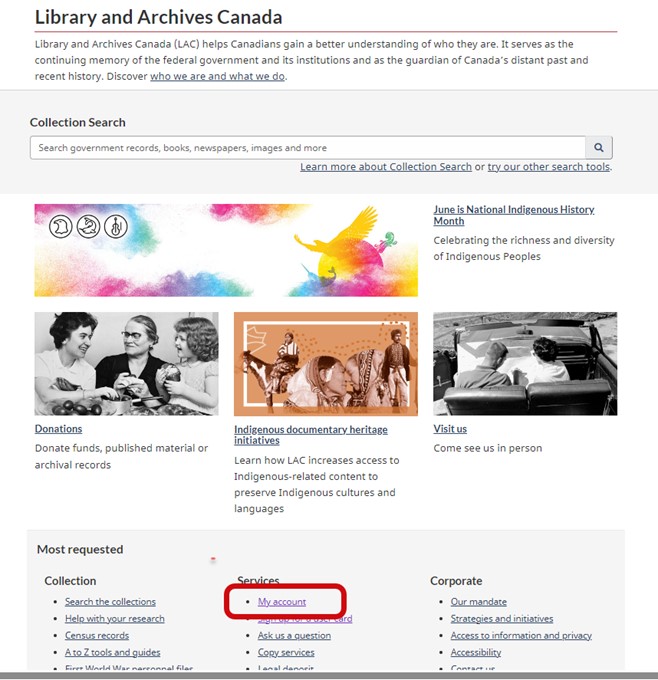
Access My account through the Services section on LAC’s homepage. Source: Library and Archives Canada.
Once logged into your My account, click the Track my archival order action button in the My account dashboard or access it via the top-right dropdown menu.
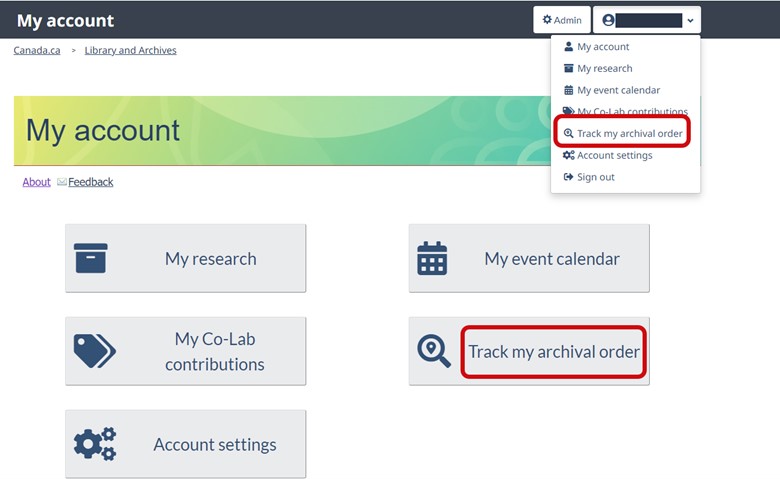
Access Track my archival order through the action tile or dropdown menu in the My account dashboard. Source: Library and Archives Canada.
Viewing your orders
After clicking on Track my archival order, you will see a list of your archival orders, which you can filter or narrow down by using keywords in the search bar or limiters in the left-hand column. You can also sort your orders by “newest,” “oldest,” and “due soon.”
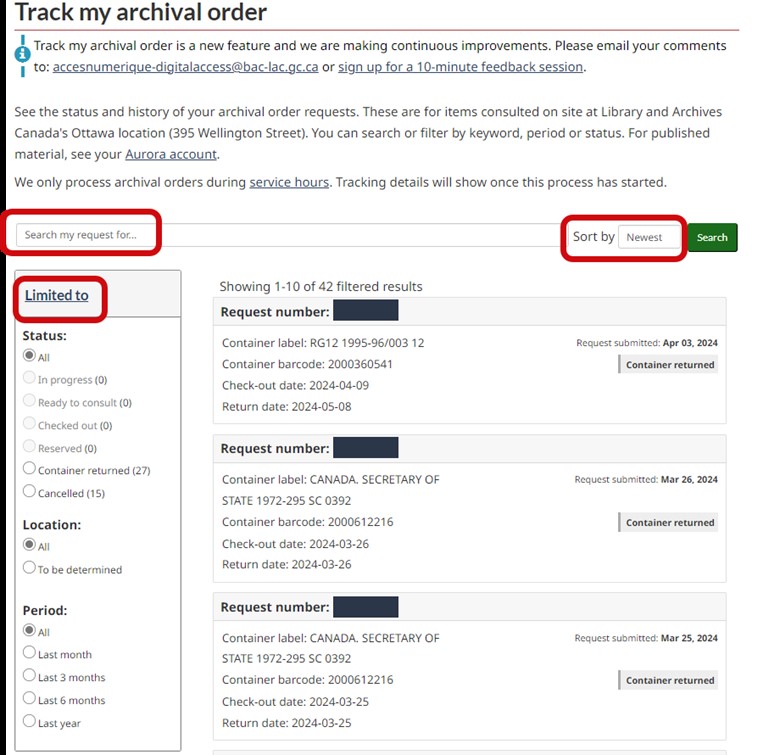
Filter and narrow down your orders by using keywords in the search bar or limiters in the left-hand column. You can also sort your orders by “newest,” “oldest,” and “due soon.” Source: Library and Archives Canada.
Each order will provide details, such as request number; container label; container barcode; date of submitted request; status; check-out date; pickup location and due date.
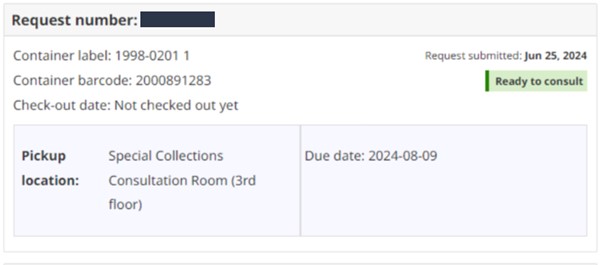
Example of the details of an archival order. Source: Library and Archives Canada.
Important note: To track your archival orders, the name and email address used for your My account must match those on your user card. Mismatched details will result in the error message “Your account is not connected to a user card.”

The “Your account is not connected to a user card” message. Source: Library and Archives Canada.
If you receive the “Your account is not connected to a user card” message, verify the email address attached to your My account via Account settings.
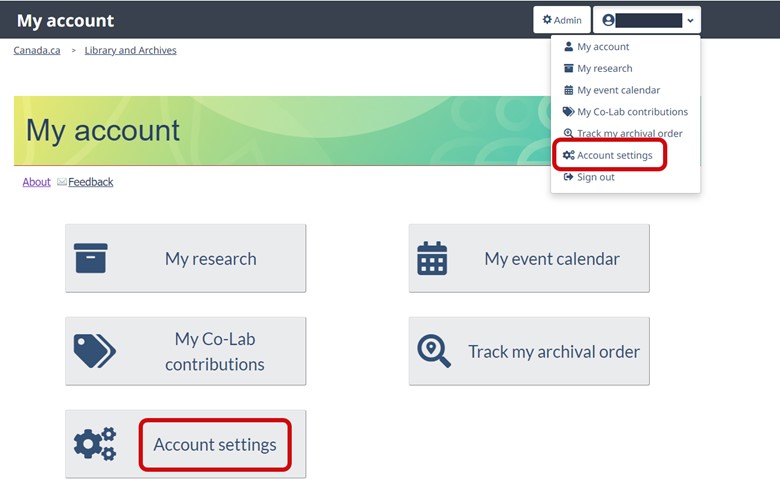
In the My account dashboard, you can access Account settings through the action tile or dropdown menu. Source: Library and Archives Canada.
To update the email address attached to your user card, click on Renew or Update Card on the Sign up for a user card webpage.
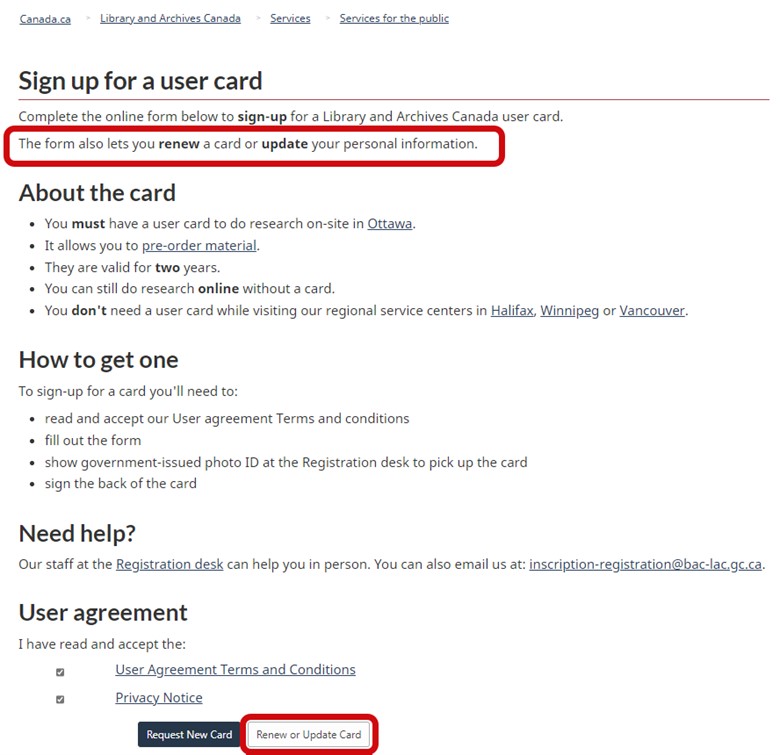
Form used to sign up for, renew or update a user card. Source: Library and Archives Canada.
Please note that LAC only processes archival orders during service hours and closer to the date of your visit, at which point you will be able to see the tracking details. Submitting the web retrieval form will not activate this feature.
We always aim to improve TMAO. If you have any suggestions or comments on how to enhance this feature, please email us at accesnumerique-digitalaccess@bac-lac.gc.ca.
Happy tracking!
Frequently asked questions
Why can’t I see my archival order in My account?
You may have used a different name or email address when registering for a user card. These details must be identical in both applications.
Why can’t I immediately track my order after submitting the Order archival material form?
Orders are only processed during service hours by LAC staff. You can track your orders once processing begins. Submitting the web retrieval form will not activate this feature.
What do the different statuses mean?
- In process: A LAC staff member has started the retrieval process.
- Ready to consult: The order has arrived at the specific delivery location.
- Checked out: The containers from the order have been checked out to you and are in your possession.
- Reserved: The container is checked out to another user, but a reserve has been placed for you. Please note that a request number will only be assigned once the box is made available.
- Container returned: The container was returned by the client, checked back in by LAC staff, and returned to storage.
- Cancelled: The order was cancelled.
Can TMAO track my reproduction request?
No, TMAO only tracks orders for items selected for on-site consultation at LAC’s Ottawa location at 395 Wellington Street.
What are the container label and barcode?
- Container label: Associated with the reference numbers of the requested documents.
- Container barcode: Unique to each container, it allows tracking of the box of records during the circulation process. It is also linked to the container’s permanent storage location.
Why can’t I track my archival order in LAC’s regional locations?
TMAO is currently linked to an application used only in the Ottawa region. We hope to expand this feature to other points of service in the future.
Yannick Lacroix is a product owner for Digital Access in the Access and Services Branch at Library and Archives Canada.
 Library and Archives Canada Blog