Bilingual census data: a better search experience for all Canadians

Web banner for The 1931 Census series. On the right, typed text: "The 1931 Census". On the left, moving train going by a train station.By Julia Barkhouse

This article contains historical language and content that some may consider offensive, such as language used to refer to gender, racial, ethnic and cultural groups. Please see our historical language advisory for more information.

Library and Archives Canada (LAC) is the guardian of Canada’s distant past and recent history. It holds the historical census returns for Canada, including some dating back to New France and some for Newfoundland. We have indexed some dating from 1825 to 1926, and these are available online through Census Search.

Before Confederation, censuses were generally collected in either English or French, depending on the location. The Dominion Bureau of Statistics (now Statistics Canada) phased in bilingual forms after Confederation in 1867.

Example of a bilingual Census 1921 form enumerated in English and French:

A census-taking sheet from Census 1921. This particular image is page 6 for the sub-district of Scots Bay in Kings District, Nova Scotia.

Census 1921 form enumerated in English (e002910991).

A census-taking sheet from Census 1921. This particular image is page 19 for the sub-district of Wolfestown (Township) in Richmond-Wolfe District, Quebec.

Census 1921 form enumerated in French (e003096782).

The language used to record answers to census questions may reflect the language preference of the enumerator or the language in which the answers were provided. The historical census data that we have reflects our linguistic duality as a nation. Census returns from Quebec and some parts of New Brunswick and Manitoba are written (or, enumerated) in French, while the rest of Canada was enumerated in English.

When our partners, including Ancestry and FamilySearch, indexed the censuses from 1825 to 1926, we produced a wealth of data with names of individuals, their gender, marital status, etc. However, we were faced with a serious challenge: census data could be collected in either English or French depending on the personal preference of the enumerator. So how did we handle this?

Life as an Enumerator

Let us detour for a moment and describe the journey of the enumerator. Enumerators were Canadians hired by the Dominion Bureau of Statistics to collect census data in one or more sub-districts. They received a book of instructions (such as this one for Census 1921) that detailed what they were supposed to write on the form depending on what people answered. They were given a booklet of census return forms and instructions on which sub-districts to enumerate. Then this person had a timeframe to enumerate a number of sub-districts and mail these forms back to the government department. You can imagine this person going from door to door in a horse-drawn carriage or perhaps an early automobile (maybe a Ford Model T) by 1921.

The enumerator knocked on the door and asked to speak to the head of the household (typically the father and/or husband). They might be invited in to sit at the kitchen table as they asked questions. If the family was not home, there might be a notice or calling card left on the door with contact details to follow up and meet the enumerator by a given date to be counted in the census.

Depending on the province in Canada, the enumerator either wrote down information in the language of the person speaking or in their personal language preference. Therefore, it is possible that French regions of Canada around Quebec, New Brunswick and Manitoba were enumerated in one or both languages depending on the enumerator’s personal preference.

Fast forward: the data captured on the forms was transcribed by our partners around 92 years after the census taking and put online.

Language Barriers

When LAC put these databases online, we noticed that we had data in both languages. If you wish to search for your ancestor, you have to search in the language of the enumerator. Did the enumerator write your grandmother’s information in English or French? Does your name have an accent (é, è …) that might have been misheard (or not captured) by the enumerator? Does your uncle’s name have a silent “h” that might have been omitted? This creates a language barrier for our researchers, who want to find people but do not speak the language used at the time. Some of our Francophone researchers have to search in English to find their French-speaking ancestors. This is an unbalanced search experience for Canadians who access our Census Search interface in French.

Creation of Census Search

When the Digital Access Agile Team reorganized and consolidated the 17 census databases into Census Search last November, we wanted to deliver a better search experience for all Canadians. Our aim was to provide the same search experience for Francophones as for Anglophones, so that any of our clients who use the French Census Search interface can search and get the same results as if they were searching in English.

So how do you do this? How do you translate information like gender, marital status, ethnic origin and occupation for over 44 million individuals to offer an equal experience for all Canadians? It’s actually very simple. The solution? Data cleanup.

A Peek Under the Hood

Let’s go behind the scenes for a moment to look at how census data is saved. Census Search is the public interface that LAC clients can use to search. The census data for each individual in Census Search is saved in one master table called EnumAll.

Census data saved in a table in SQL Management Server.

Screenshot of Census.EnumAll from SQL Management Server (Library and Archives Canada).

In this table, each line represents an individual person. The data captured about that person is separated into columns. If we do not have data in a particular column, it says NULL.

Creation of Common Data Pools

Census.EnumAll acts as the master data table. From this, we created common data groups (or, pools). What do I mean by this? We copied all of the data for one of the columns (Gender, Marital Status, Ethnic Origin, Religion, etc.) into a separate table. The only information in this separate table is a list of Genders or options for Marital Status, etc. We call this a common data pool, meaning that all the data in this table (or, pool) relates to one piece of information.

The common data table separates the data (e.g., “Male” or “Female”) from the individual person. If you look at 44 million individuals, you see the same data repeated, such as the number of times the enumerator wrote “Male” or “Married.” In a common table, you see “Male” only once, with a value count for the number of people with this information (which we call an attribute).

This is where the magic happens.

The Gender table in the back end of Census Search. Of note, there are variances (Male and M, Female and F) and two columns titled TextLongEn (English display) and TextLongFr (French display).

Screenshot of T_Gender from SQL Management Server (Library and Archives Canada).

As you can see in this separate common data table, we can do more things. With codes, we establish one way to write each Gender (in this example). This is called an authority. We then perform cleanup so all the variants point to this one authority. In the screenshot above, you’ll notice a variance between “Male” and “M.”

Once we have this authority, we create columns for how we want to display the information in Census Search. We create an English (TextLongEn) and a French (TextLongFr) display. We then add the bilingual translation once and it applies to everything. In this case, we translated “Male” to “Homme,” and it applies to all 20,163,488 people who identified as “Male” across 17 censuses.

We then put all the tables back together and index the records to display in Census Search. So depending on the language of your choice, the interface and the data itself will now translate for you.

English Census Search interface showing Gender drop-down with values for Female, Male and Unknown alongside the French Census Search interface showing the same drop-down with Gender values for Femme, Homme and Inconnu.

Screenshots of Census Search in English and French (Library and Archives Canada).

Now, when I search for my great-grandfather, Henry D. Barkhouse, and display any of his census entries, the data translates as well.

Two screenshots, one in English and one in French, of a Census 1911 record for Henry D. Barkhouse, with arrows pointing out where the data translates.

English and French display of Census 1911 record for Henry D. Barkhouse (e001973146).

Progress Check-in

As you can imagine, this work takes time as we diligently clean up and translate our data. Our first priority was to create drop-down menus on Census Search for Gender and Marital Status. Now, if you wish to search by either of these fields, you will see a short list of terms that are translated and available in both official languages. As we continue this work, our next priorities are Ethnic Origin and Place of Birth. We are about 60–70% finished with these two, and our clients should see new options coming to Census Search in 2024. After these two priority fields, we will continue to translate other fields like Religion, Relationship to head of household, Occupation, etc.

Conclusion

Consolidating all 17 censuses into one platform, Census Search, gave us the opportunity to create a bilingual display for our census data by cleaning up the data. Since its launch, our platform delivers a more equal search experience in the language of your choice. I encourage you to try it out and tell us if your search experience has improved.

As always, we love to read your feedback and ideas via our email or you can sign up for a 10-minute feedback session with us.


Julia Barkhouse has worked at Library and Archives Canada in data quality, database management and administration for the last 14 years. She is currently the Collections Data Analyst on the Digital Access Agile Team.
Creation of Census Search

By Julia Barkhouse

We all love the Census. It’s the number one genealogical resource for finding ancestors because it gives reliable information on every Canadian, where they lived, how old they were, whether they worked, and other useful tidbits. It provides a snapshot of our population at a given time and place.

I love the Census for making it possible to track the movements of my great-grandfather, Henry D. Barkhouse. He was the inspiration for the recent work that my team, the Digital Access Agile Team, did to consolidate and release Census Search Beta in November 2022.

I want to take you through my journey in researching Henry D.’s life in the Census. He was born in 1864 and died in 1947 in Nova Scotia. My father never knew him, as he passed before my father was born. A very tall man, he married my great-grandmother, Samantha Udora (Dora) Butler, in 1899 in Scots Bay, Nova Scotia. They had eight children. He was a farmer, and his homestead has been passed down in my family to the present day. Other than this basic information, I know very little about him.

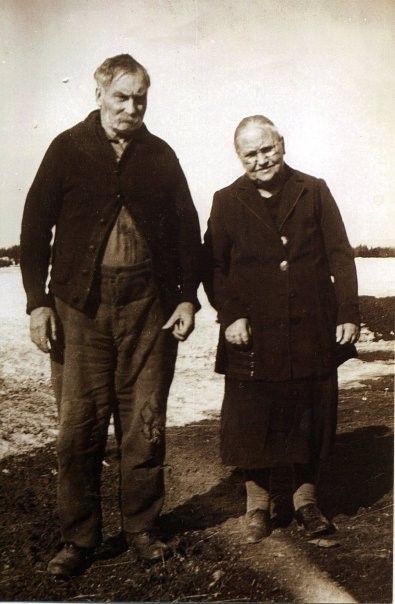
Photo of Henry D. Barkhouse and Samantha Udora (Dora) Butler at their homestead.

Henry D. Barkhouse (1864–1947) and Samantha Udora (Dora) Butler at the Barkhouse homestead in Scots Bay, Nova Scotia (c. 1930–1947). Image courtesy of the author, Julia Barkhouse.

Before starting my research, I record the information that I know about Henry D.:

  • Last name: Barkhouse
  • First name: Henry D.
  • Gender: Male
  • Dates: 1864–1947
  • Occupation: Farmer
  • Province: Nova Scotia (I didn’t know the district or sub-district)

Armed with this information, I expect to find Henry D. in the censuses from 1871 to 1921. The 1931 and 1941 censuses are not yet available.

The research journey begins, and I find him in the 1871 Census.

A page from the 1871 Census of Canada featuring Henry Barkhouse’s information.

Page of Census of Canada, 1871 (Item Number: 3150873)

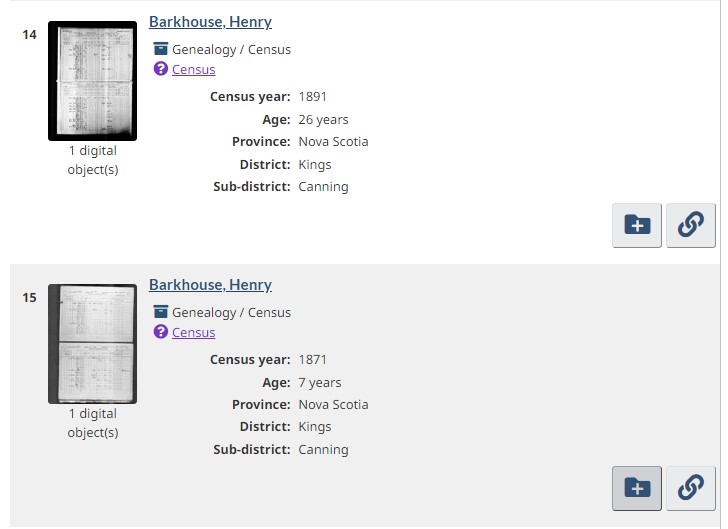
With the first hit, I learn more about him. The census record confirms that he was born in 1864 and that he was seven at the time of the Census in 1871. Now, I can fill in the gaps with the district and sub-district names for Scots Bay. I also learn his religion. I can view the image and get more information about his education and whether he had any infirmities. I can also connect to his parents (James and Rebecca) and his brothers and sisters. Now, I have more information that I can use to find him in other censuses, and I can update my family tree.

At this point, I realize that I have to replicate this search in other Census of Canada databases. I decide to perform the same search in the 1881, 1891, 1901, 1911 and 1921 censuses. Performing the same search five more times will be long and (dare I say) frustrating.

Inspiration strikes: What if I could consolidate all the censuses into one master database of census records? This would allow me to use the same search parameters, search Henry D.’s name once, and get all the hits from all Census databases. I could view the results from 1871 to 1921 on one screen and use our built-in tools to save these results to MyResearch in order to come back to them later. This would shorten the time it takes to do research on each ancestor.

This idea required some quality thinking. Each census is slightly different. While it appears that all censuses capture similar information, the early ones (before Confederation) differ greatly from those conducted after 1867. As well, there were censuses of individual provinces (Ontario and Manitoba) and the Prairie Provinces (formerly “the Territories”). The search raised a number of questions, the biggest of which was: What happens when you put that amount of data in one database?

Conducting the search was a daunting task. Library and Archives Canada has 17 Canadian censuses comprising almost 44 million names. Each name is a record in our database. The search started with a detailed analysis of each census to compare and contrast the data captured in our databases. In this analysis, my team came up with a workplan and identified several improvements or questions to address after the launch. Our first release is Census Search Beta, which combines the 17 Census databases into a single interface. We call it “Beta” to indicate that our product is nearly complete and is being improved every two weeks. Our acceptance criteria before releasing the Beta product to the public were the following:

  • A search interface with all the fields currently available in our standalone databases plus a few more based on feedback from our clients (for example, gender, ethnic origin, place of birth, religion, occupation);
  • Search results with filters for province, census year, district and sub-district;
  • An item display that shows the digital object in our harmonized viewer and the full list of available fields (such as name, gender, age).

Once the censuses were migrated and available in Census Search, we were able to improve the overall search experience for our clients. Now, you can zoom the images with our harmonized viewer or view in fullscreen. You can also download and export your search results in a variety of formats (HTML, XML, CSV or JSON). You can save records to MyResearch and come back to them later. You can add transcriptions or comments to Co-Lab to tag or translate the images. You can suggest a correction to a record and help us improve the Census data.

Screenshot of Census Search with Julia Barkhouse’s great-grandfather’s information by first name, last name, and province limited to Nova Scotia.

Screenshot of Census Search (Library and Archives Canada website)

The first release for Census Search was a considerable task, and we are very happy with our achievement. We also have a blueprint for improvements moving forward. Following our initial launch, we have a number of questions and issues that we want to investigate and for which we want to come up with viable solutions. You will see these released as improvements to Census Search as we move out of the Beta phase. The purpose of this work is to:

  • bundle the images so users can navigate to the next page and view persons or families who may have been enumerated at the bottom of one page and whose information is continued on the next;
  • program the search interface to adjust itself with greyed-out text or pop-up messages for instances where not all censuses have data for all fields (for example, ethnic origin, place of birth, religion)
  • track the geographical changes to the country over time. Once the data was put together, we wanted to track the changes to provinces, territories, districts and sub-districts;
  • find a way to isolate one person and connect this person in each census, or to connect a person and their relationships to other people;
  • add any additional schedules (for example, agricultural schedules) to Census Search, and identify whether a person has additional information there;
  • clean up the data, and create historical data dictionaries that contextualize the terms used at the time (for example, “ethnicity”);
  • sort the search results to group together people by census year or in alphabetical order (ascending or descending).

As for my great-grandfather? Now, when I search for Henry D. in Census Search, I get his results from 1871 to 1921. I can save them to a list in MyResearch and come back to them to trace other family members as well. As we add more enhancements to Census Search, I will be able to page through the Census and view his family if they are enumerated over two pages. I will be able to see whether Henry D. has an entry in the agricultural schedules, since he was a farmer. I might learn how large his farm was and whether he kept chickens, pigs or cows.

Screenshot of Census Search results saved in MyResearch.

Screenshot of Census Search results saved in MyResearch (Library and Archives Canada website)

Creating Census Search has been a journey, and we have only just begun. As you can see, we have many enhancements and features coming to make the experience more enjoyable for you, our clients. Consolidating 17 datasets into one database was only the first step. We hope you will join us as we develop this free resource for you. You can send us your feedback via our email. You can also sign up for a 10-minute feedback session with us.


Julia Barkhouse has worked at Library and Archives Canada in data quality, database management and administration for the last 14 years. She is currently the Collections Data Analyst on the Digital Access Agile Team.