Census 1931, a peek into digitization

Version française

By Melissa Beckett and François Deslauriers

A glimpse into the microfilm room
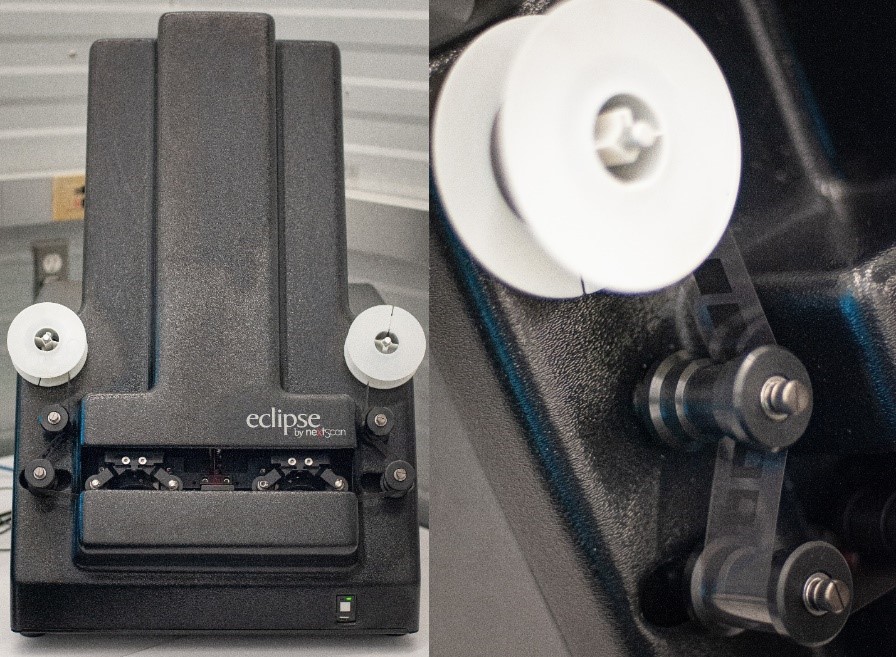
Two photographs of the Eclipse Rollfilm scanner by nextScan; on the left, a view showing the full scanner, and on the right, a close-up of the reel with some film threading past two of the rollers.

The Eclipse Rollfilm scanner by nextScan. Credit: François Deslauriers

In a dimly lit room, two imaging specialists sit in opposite corners. Each stares at their screen, where a series of images is constantly flowing from one side to the other. The rhythmic mechanical sounds of the microfilm scanners are occasionally interrupted by the high-pitched whine of the rewind, and a clunk as the last of the film winds back around its reel. With white-gloved hands, a specialist removes the reel from her scanner and places it back into its round metallic canister, which she returns to its archival box. She removes the next canister and slices around the taped edge with a pocket knife. She takes out the reel and mounts it on the scanner, winding the film around a series of rollers and then onto another plastic reel.

Meanwhile, the other specialist has stopped the process on his scanner. He needs to readjust some settings because the images in this section of the reel are much brighter than the earlier ones. He adjusts the exposure values in the software until he is satisfied with the appearance of the images in the preview window. The specialist scans a short section of film and opens it in the auditing software to double-check. He views one of the documents at full size, examining it closely. He then rewinds the film to the beginning, starting the scanning process all over again.

The project

For the Census 1931 project, the Digitization Services team digitized 187 microfilm reels, for a total of 234,678 images. At this time, by law, the reels were still subject to statistical secrecy, and a security procedure/protocol had to be followed. Only “deemed employees” who had taken the Statistics Canada Oath or Affirmation of Office and Secrecy were authorized to view the material. Reels were kept locked in a secure room, and all digitization was performed completely off-line.

The Census 1931 microfilm reels contain about 1200 images of census documents on each reel of 35-mm black-and-white polyester film. The imaging specialist digitizes from the print master, a copy of the archival master reel, in order to prevent any deterioration of the original.

Microfilm is an effective means of preserving information for long periods of time (reels can last for 500 years). Microfilm stores vast quantities of information in a small amount of space and supports preservation of the documents contained by removing the necessity of handling them. Digitizing microfilm reels provides another level of preservation as well as of accessibility to the public, who are then able to view the images from anywhere with an Internet connection.

The scanning process
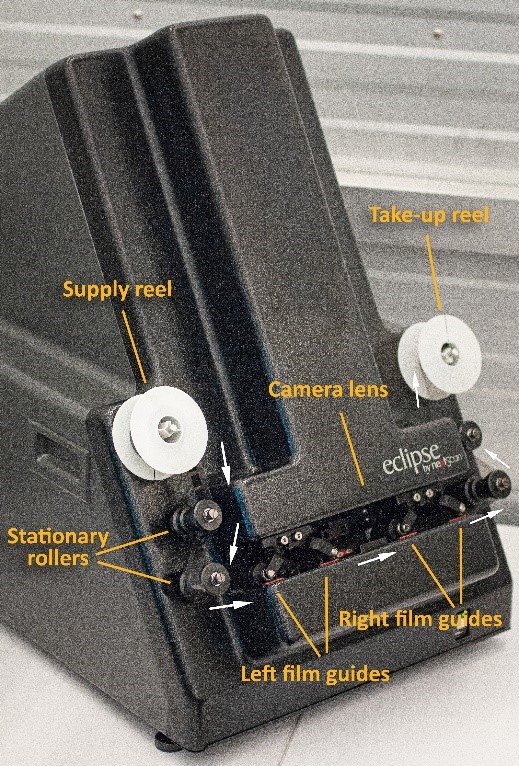
A photograph of the Eclipse Rollfilm scanner by nextScan, with labelled supply reel, stationary rollers, film guides, camera lens and take-up reel.

The Eclipse Rollfilm scanner by nextScan, with main components labelled. Credit: François Deslauriers

For this project, the digitization of the 1931 Census was performed with the use of the Eclipse Rollfilm scanner by nextScan, a dedicated microfilm scanner designed to digitize both 16-mm and 35-mm reels, in conjunction with an off-network computer. Film is threaded from the supply reel past stationary rollers and film guides to a take-up reel. The pinch rollers lower to hold the film in place on the film guides, automatically adjusting the tension of the film. The film is guided past a macro lens and digital sensor above, while lit from below through the film emulsion by a strip of red light. The reel is digitized as one long, uncompressed, grey-scale image file, referred to as a ribbon.

The imaging specialist handles the film using cotton gloves, being careful to touch the edges only. With the NextStarPLUS® Capture software, the reduction ratio (which is noted on the film and allows images to be reproduced at a 1:1 ratio) must be set, in addition to the resolution, film type (16-mm or 35-mm) and polarity (negative or positive). Before scanning, the specialist must also ensure that the exposure of the images is correct and that the lens is focused so the image is sharp.

With a live view on the screen, the specialist makes adjustments to the exposure and the focus. The specialist may zoom in on a focusing chart, as well as on the manufacturer’s information, printed along the edge of the film at regular intervals. The appearance of scratches or dust on the film can also be useful for determining sharpness. While the documents can be used to focus, this is only reliable if they were originally photographed with perfect sharpness.

A preview window during scanning allows the specialist to see when it is necessary to readjust settings over the course of scanning. When the documents were initially photographed, there may have been changes in lighting and exposure settings over the course of the reel. This results in some images appearing brighter or darker. The goal in digitizing each reel is to ensure that most of the documents will be legible, since adjustments in tonal values can only be made for the entire length of the film and not for each individual document.

After scanning is complete, the specialist rewinds the film and returns the reel to its canister.
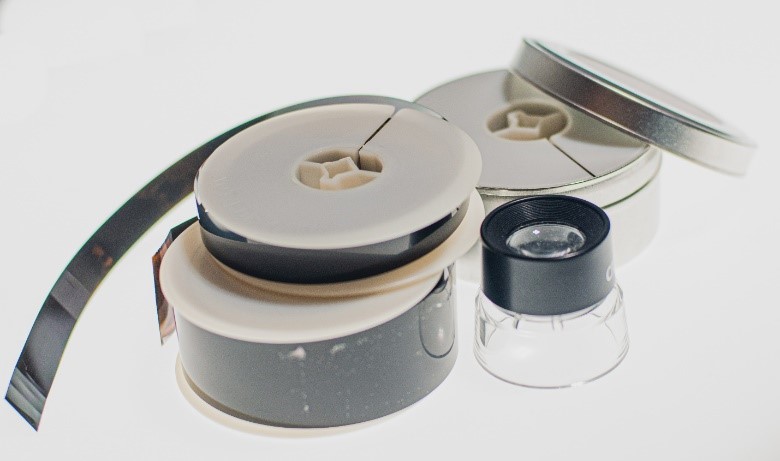
A photograph of a 16-mm microfilm reel stacked on top of a 35-mm microfilm reel, next to a loupe, in front of a 35-mm microfilm reel in its canister.

16-mm and 35-mm microfilm reels. Credit: François Deslauriers

The auditing process

After scanning the reels, the imaging specialist uses the NextStarPLUS® Auditor software to process the ribbons (the long image files associated with each reel). The software is used to detect and select each individual document within the ribbon so that they can be exported as separate image files. According to its detection settings, the software generates coloured rectangles around the documents. The specialist scrolls past rows of documents to select those that were not detected by the software and to adjust any rectangles that do not contain the whole document. On a second scroll through, a blackout setting changes the contents of the rectangles to black. This leaves any unselected white parts visible, making it easier to spot anything that may have been missed on the first pass, for additional quality control.

Each digitized document in the census is assigned an e-number, a unique identifying number used in this project to sort the images by place.

The images were initially exported as 10-megabyte TIFF files. TIFF is a “lossless” file format, meaning that there is no image compression. For the purposes of the project, JPEG derivatives (a “lossy” file format that requires less storage space and is more accessible) were created to aid in matching the digitized images to the census geographic districts and sub-districts, as well as for external partners working in artificial intelligence (AI). Information Technology created a script to efficiently turn the TIFF files into JPEGs.

Yesterday and tomorrow

Working in digitization at Library and Archives Canada means constantly improving processes and exploring new techniques and technology, to create the best-quality images possible. The 1931 Census was no different. As imaging specialists, we have been glad to play a small part in keeping Canada’s history alive and making it accessible to the public.


Melissa Beckett is an acting Imaging Specialist in the Digitization Services Division at Library and Archives Canada.

François Deslauriers is an acting Manager of Reprography in the Digitization Services Division at Library and Archives Canada.

Top 5 topics addressed by our Reference Librarians

By Emily Dingwall

At Library and Archives Canada (LAC), reference librarians respond to requests on a wide variety of interesting topics from clients. This blog post outlines five types of reference questions librarians frequently handle and suggests resources to consult on these subjects.

The cover page from Sessional Papers of the Dominion of Canada with the title “Public Accounts of Canada, for the Fiscal Year ended 30th June, 1884.”

“Public Accounts of Canada” report found in Sessional Papers of the Dominion of Canada, 1885, Vol. 1, No. 1. (OCLC 1007491677, image from Canadiana)

  1. Federal government documents

Annual departmental reports. Clients are often seeking annual departmental reports. Annual reports from Confederation in 1867 to 1925 are printed in the Sessional Papers of the Dominion of Canada. Learn more about the Sessional Papers of the Dominion of Canada, 1867 to 1925. If you are in Ottawa, you can access the Sessional Papers at LAC by requesting them from staff in the 2nd floor reference room. They are also available through these websites:

Departmental reports post–1925 are published separately from other government documents in the Sessional Papers. You can request 1925–1930 annual reports from LAC staff or through the Internet Archive.

After 1930, search our library catalogue Aurora for annual reports by the name of the department as it was known  during that period.

Beginning with 1995, you can find annual reports at the Government of Canada’s Departmental Results Reports. For more recent years, you can search the specific government department website.

Parliamentary documents. We also receive many questions on searching parliamentary debates, journals and committee materials of the House of Commons and the Senate, such as for a speech made by a prime minister in the House. You can find these documents online:

A typewritten page with two columns of text, separated by a crest. The text on the left is in English and the text on the right is in French.

Front page of the Canada Gazette, Part II, Vol. 137, No. 23, November 5, 2003. (OCLC 1082716964, image from Canada Gazette)

  1. Legislative Research

Librarians frequently receive questions about legislation in print or legislation that can be found online through Justice Laws.

You can trace legislation through these main sources:

  • The Statutes of Canada include all acts and amendments to laws passed during each session of Parliament.
  • The Revised Statutes of Canada (R.S.C.) are consolidations of the Statutes of Canada incorporating amendments and acts that have been added since the last revision. The R.S.C have been published for the years 1886, 1906, 1927, 1952, 1970, and 1985.

The Statutes of Canada and the Revised Statutes of Canada are available in print format in our reference collection at LAC, as well as at many public and academic libraries. They are also accessible through the legal database LLMC Digital, which can be searched onsite at LAC.

To learn more about the Statutes and researching legislation, see the blog post Tracing Historical Legislation.

You can find official regulations and statutory instruments in Part II of the Canada Gazette, the official newspaper of the Government of Canada. Published in three parts, the Canada Gazette is searchable by keyword at these sites:

To learn more about the three parts of the Canada Gazette please see Canada Gazette publications.

Readings of bills, such as the First and Third readings, can be found by searching the library catalogue Aurora.

LEGISinfo, the Library of Parliament’s research tool, provides information on all bills considered by the Senate and the House of Commons since the start of the 37th Parliament in 2001.

An image of a four-column newspaper, Courrier canadien.

Courrier canadien, March 11, 1900. (OCLC 109270836)

  1. Newspaper Research

Librarians often assist clients in searching newspapers for information such as local histories, articles on individuals, or references to a past royal visit to Canada.

We hold newspapers in print and microfilm formats, which can be found through the Aurora library catalogue. We also subscribe to several newspaper databases.

The Geographical microform list names all the newspapers that we hold on microfilm (click on the OCLC number), as well as newspapers available online. The list is organized by province/territory, then alphabetically by location.

Major newspaper titles such as Le Devoir, the Montreal Gazette, and the Ottawa Citizen are available in our self-service microform reading room.

These newspaper databases can be accessed on the public workstations in our reference room: The Globe and Mail, Toronto Star, Paper of Record and Newspaper Archive.

Online newspaper resources include:

The cover page of “Official History of the Canadian Army in the Second World War.”

Cover page of Colonel C.P. Stacey’s Official History of the Canadian Army in the Second World War, Volume I: Six Years of War: The Army in Canada, Britain and the Pacific. (OCLC 317352934, image from Government of Canada publications)

  1. Military History Research

Librarians receive military history questions from clients looking for published histories of specific regiments/units, recruitment statistics per year, and locations of Canadian units in Europe during World War II.

Resources for military history research include:

An image of a Grand Trunk Railway timetable from 1922.

Timetable of the Ontario lines of the Grand Trunk Railway from 1922. (e011297622)

  1. Railway Histories

Many clients contact Reference Services about railway history research. Examples of questions we receive include the histories of specific train stations, the histories of railway companies (Canadian Pacific Railway, Canadian National Railways, Grand Trunk, etc.), and routes of particular railway lines.

We hold railway maps, as well as passenger and employee timetables in print format that can be located by searching Aurora. Many timetables are part of the Merrilees Transportation Collection, which contains about 5,000 publications including books, trade literature, technical manuals, timetables, broadsides, periodicals and pamphlets.

An Ontario railway historian has made rail timetables available on Charles Cooper’s Railway Pages.

Canadian Pacific Railway timetables from 1930–1985 are available through the Chung Collection at the University of British Columbia Library.

These are two excellent print publications to consult on railway history:

  • Andreae, C., & Matthews, G. Lines of Country: An Atlas of Railway and Waterway History in Canada. Erin, Ont.: Boston Mills Press, 1997. This publication is a comprehensive outline of railway and waterway history in Canada and includes maps of railways in Canada from early days to the present. It can be accessed in our reference room.
  • Ballantyne, B., and Bytown Railway Society. Canadian Railway Station Guide. Ottawa: Bytown Railway Society, 1998. This publication lists stations, plans and pictures.

 I hope that these resources will help you with your research on these subjects. Of course feel free to ask us a question on any topic, and a reference librarian will be happy to assist you!


Emily Dingwall is a Reference Librarian in the Reference Services Division at Library and Archives Canada.

How to retrieve a Canadian newspaper when visiting LAC on site

Thanks to our article on “How to Find a Canadian Newspaper on Microfilm” you may now know how to easily access our Geographical List and how to read a newspaper entry. But how can you access these newspapers while you are on site at 395 Wellington Street in Ottawa?

Some of our newspapers on microfilm are available in the self-serve section on the third floor, but most need to be requested via AMICUS, our library catalogue. Once you have located your AMICUS number, you can make a retrieval request in AMICUS by following the steps below:

To access our AMICUS catalogue, go to one of our computer workstations and open the Internet browser. You can access the catalogue by selecting the “Library Catalogue – AMICUS OPAC” link from the workstation homepage.

Use the AMICUS number to get to the correct record by selecting the “AMICUS No.” option from the drop-down menu.

Remember:

Not all the AMICUS records have been updated to show all the newspaper dates available. If you don’t see your date listed in the AMICUS record, don’t worry! You can trust the dates given in the Geographical List even if you don’t see them in the AMICUS record.

Once you have found the right record for your date range, press the “Retrieve” button. Enter your date in the first space provided and don’t forget to enter your user card barcode number.

Your retrieval request will take 2 to 3 hours to process. You can then retrieve your microfilm reels in the third floor Consultation Room. Make sure to search for them under the first letter of your last name. You will find microfilm readers available in the same room. For more information on using these microfilm readers, consult our article “Tips and tricks on how to use a microform reader”.

Questions or comments? We would love to hear from you!

Tips and tricks on how to use a microform reader

Numerous documents belonging to Library and Archives Canada’s collection have been copied to microfiche and microfilm (some of which are available via AMICUS, and others via self-service at 395 Wellington Street, Ottawa). First-time researchers may find the equipment required to view this material somewhat confusing.

Therefore, we have prepared a quick list of Do’s and Don’ts to guide you in the proper use and handling of these machines so that your research may be profitable.

DO’s:

  • Prepare ahead of time for your visit and order material in advance, if necessary. To learn how, please consult our previous blog article: “The Top Five Things You Need to Know Before You Visit”.
  • Retrieve your microfilm from the Consultation Reading Room shelves, which are organized by the first letter of your surname, or retrieve self-serve microfilm from the Consultation Reading Room microfilm drawers.
  • Sign in with the Consultation staff in the Microfilm Reading Room for access to a microform reader.
  • Ask the Consultation Staff for assistance if you require help loading the microform onto the readers.
  • Bring your own flash drive or CD/DVD to save digital copies of the material. Printed copies may also be purchased using a copy card, available at the Consultation Office.
  • When making digital scans from microform, please complete a “photo permission” form (used primarily for statistical purposes).
  • Be aware that making copies from microform (either on paper or as digital images) can only be done during service hours.
  • Place the self-serve microfilm reels on the return shelf, located behind the Consultation staff’s desk (in the Microfilm Reading Room) when you are finished with them.
  • Return published microform (that is, the ones you have ordered via AMICUS), to the Published Material return shelf located near the Consultation Office.
  • Consult the Special Collections staff for access to the National Map Collection (NMC) microfiche.

DON’Ts:

  • Don’t place self-serve microfilm reels in your locker. When self-serve microfilm reels are not being used, they must be available for other clients.
  • Don’t disobey the Copyright Act by making digital copies of newspapers less than 100 years old. For more information, please consult the rules posted by each photocopier.
  • Don’t leave microfilm reels at your work station or on top of cabinets.

For more details, be sure to ask our on-site Consultation staff. They are ready to answer any additional questions you may have.

Happy research!

Questions or comments? We would love to hear from you!

Why Consult Newspapers on Microfilm?

We have already discussed how to find Canadian newspapers on microfilm; and you might have wondered why we have to turn to microfilm in the first place? Aren’t these newspapers available online?

The short answer is that only some of them are (*). Most newspaper editions available electronically for free are limited in their content, and the issues usually start only in the 1980s. If you are interested in full-page content and original layouts, or need to access older issues, some major dailies like the Globe and Mail, the Toronto Star and the Winnipeg Free Press offer historical versions in PDF format for a fee. As well, your local library may subscribe to a particular daily, or you may also purchase access yourself.

Another option is to access Library and Archives Canada’s newspapers on microfilm, an extensive collection that:

  • includes major newspapers, as well as local, labour, ethnic and student papers;
  • allows you to research aspects of newspaper publishing, such as design, layout and advertising, not contained in the electronic versions; and
  • provides access to content excluded in the electronic versions, including photographs, classifieds and obituaries.

Come visit us in Ottawa to consult these newspapers on microfilm and discover our collection, or contact us for more information.

* The following are examples of free digital newspaper collections:

Questions or comments? We would love to hear from you!

How to find out if a war diary from the Second World War is on microfilm

The article War Diaries: Discover what individuals or military units did during the war explores war diaries, their usefulness and how you can access them. Now, you may wonder: In what formats are they available?

Most First World War Army diaries have been digitized. As for Second World War diaries, some were microfilmed, but many are available in their original paper format only.

To find out if a war diary from the Second World War is available on microfilm, you must perform a search in the Archives Search database. After you have selected the relevant diary title, just refer to the Conditions of access section of the archival description.

For example, the war diaries of the 1st Armoured Car Regiment (Royal Canadian Dragoons) for September and October 1945 are accessible on microfilm reel T-12563.

Although some microfilm reel numbers are not entered in the Archives Search database, we have created a list of reel numbers that you can consult on-site at 395 Wellington Street, in Ottawa, or by contacting Reference Services.

Questions or comments? We would love to hear from you!

New Digitized Reels: War of 1812 Records

We are pleased to announce that you can now access 73,000 new images of War of 1812 records on its website.

Discover these valuable resources and other miscellaneous records for the War of 1812 with the Microform Digitization research tool. This tool allows you to browse these records page by page.

Library and Archives Canada (LAC) holds a unique and vast collection of records about the Canadian men and women who were involved in the War of 1812. Muster rolls, paylists, claims, certificates of service, medal registers, maps, paintings, and published sources are featured in LAC holdings that document this key event.

With these images now online, you have easy access to records for:

  • Board of Claims for War of 1812 losses, 1813–1848, Series RG19 E5A
  • Lower Canada militia nominal rolls and paylists, Series RG9 1A7
  • Upper Canada militia returns, nominal rolls, and paylists, Series RG9 1B7

For more information on recent announcements at LAC, visit “News“.

New Digitized Reels: Border Entry Records

We are pleased to announce that you can now access 121,302 new images of immigration records on our website, with the Microform Digitization research tool.

Before 1908, people were able to move freely across the border from the United States into Canada. Beginning in that year, entry ports were established along the border. From 1908 to 1918, and from 1925 to 1935, border entry records were compiled in a list format to record the names of immigrants.

By providing these images online, Library and Archives Canada (LAC) is now offering all immigration records containing nominal information for immigrants from 1865 to 1935 in its custody. Discover these valuable resources with the Microform Digitization research tool, which allows you to browse, page by page, the border entry records.

For more information on recent announcements at LAC, visit “News”.

How to Consult Material that Is Not Yet Available Online

For Archival Material – Use Collection Search

When searching for archival material (i.e., diaries, photographs etc.), use Collection Search. You will be able to search database records, known as “archival descriptions”. Sometimes the contents of the record have not yet been digitized. When this is the case, use one of the following methods to consult the material:

For Published Material – Use Library Search/AURORA

When searching for published material (i.e., books, newspapers, etc.), use either our Library Search or, for more search features, use our Aurora catalogue. The search results will often be database records (known as “bibliographic records”) and not full-text online documents. There are three ways you may consult the material:

Questions or comments? We would love to hear from you!

How to Find a Canadian Newspaper on Microfilm

Library and Archives Canada (LAC) has over 2,300 Canadian newspapers dating back to the mid-1700s, which you can access on microfilm reels or microfiche cards. Begin your research with our Geographical List, which provides the titles of community newspapers held at LAC for a given time period.

For example, to find news coverage of Queen Elizabeth II touring Rimouski,Quebec, in November 1951, on her first royal visit to Canada as Princess Elizabeth, you would follow these steps:

  1. Go to the Geographical List and select Quebec.
  2. A list of localities will appear for Quebec. Select Rimouski – Sweetsburg. You will find a list of 14 newspapers for Rimouski,Quebec, with titles appearing in red. Each title is followed by a shelf number (e.g., NJ.FM.2006), a range of dates* (e.g., ja 2001–nov 2004), and an AMICUS number (e.g., AN 9745700).
  3. The fourth title, L’Écho du Bas St-Laurent, shows the range of dates 3 mr 1933–29 av 1970. This means that LAC has that newspaper on microfilm from March 3, 1933, to April 29, 1970.
  4. Now that you have found a newspaper likely to have covered the event in 1951, write down the AMICUS number—in this case AN 7419576. You will need it to order the microfilm reel for consultation.

In the meantime, if you need more information on how to use the Geographical List or how to read an entry, visit our page on Microform Holdings.

*Ranges of dates refer to newspapers held at LAC, not the period of time they were in print.

Questions or comments? We would love to hear from you!