Improving your online experience: Analytics, feedback, improvements, user experience and changes to come on our new website

Image of fingers on a keyboardBy Andrea Eidinger

In my last blog post, I talked about how important user experience (UX) feedback was to the development and improvement of Library and Archives Canada’s (LAC) new website design. I also mentioned that we would be taking an iterative approach, continuing to evolve in response to the feedback received. Now that it’s been nearly a year since the launch, this is a great time to give you a little behind-the-scenes look about how we handle analytics and feedback, and share some details on the changes (big and small) that we’ve made and are looking to make on the website.

Analytics

Web analytics, such as the number of visits and visitors, and the average time on the site, are all helpful measures when it comes to determining the success of a website. They can tell us which pages are used most frequently and give us a sense of what our users are searching for on the site. Some more advanced features, like flows, can even show us how people navigate our website. Here is one example of a healthy flow for our “Help with your research” page, captured in January 2023.

A graphic representation of how individuals navigate our website, specifically how they arrive at and then leave a particular help page.

A look at how individuals navigate to and from the “Help with your research” page

The centre column is the page under analysis, in this case “Help with your research.” On the left is where people were before arriving at “Help with your research,” and on the right is where they went after leaving that page. For example, the top lines show people navigating from the home page to “Help with your research” to “Genealogy and family history.” This is exactly what we want to see: individuals going to their specific subject of interest. And we are also pleased that only a small number, the tiny bit of red at the bottom right in the centre, are leaving the site altogether from the help page.

Feedback

In addition to analytics, we collect users’ online experience feedback using different channels. If you’ve ever scrolled all the way down to the bottom of our web pages, you may have noticed a little box that looks like this.

A screenshot of the feedback collection tool, which asks users to answer the question “Did you find what you were looking for?” and provides them with the option to answer yes or no.

The feedback collection tool (Library and Archives Canada)

This box is called a feedback collection tool. It provides an easy, anonymous way for our users to provide us with comments about their experiences, both positive and negative. We also get a lot of feedback through our email (servicesweb-webservices@bac-lac.gc.ca), as well as through other teams like Reference Services. Our top task survey, which is the little pop-up that some of you see when you log onto the site, is another tool that is available for users to provide comments.

All of this feedback is gathered together in a single location and then analyzed. We read every single comment that you send, and we look for common problems that people encounter.

Small changes, big results

As fascinating as this information is in its own right, we are using it to make improvements across the site. Our iterative approach means we make small changes on a regular basis in response to feedback. For example, when the website was launched in August 2022, we noticed that a lot of people were using the Collection Search bar on the home page to access some of our stand-alone databases. This means that it was unclear to users what they could search and access from the Collection Search bar. This is what it originally looked like.

A screenshot of a previous version of the LAC home page, showing several entry points into the website as well as a plain text box option to search in Collection Search.

An earlier version of our home page, featuring the original Collection Search bar

To help users with their searches and navigate our website, we worked to make it more obvious what the search bar was for, how to use it and how to find other helpful resources. Here are some of the options that we considered.

Four different options for the design of the text search box, differentiated by colours, text inside the box and accompanying text.

Four different options for a new Collection Search bar

Ultimately, we combined several different features and arrived at this version.

A screenshot of the final version of the text search box, which is surrounded by a pale grey box, with the words “Search government records, letters, diaries, images and more” and links to help pages on our search engines and other tools.

The final version of the Collection Search bar (Library and Archives Canada)

And it worked! Since then, the number of searches for databases through Collection Search bar dropped down to zero. Success!

UX Research and Design

Another tool in our toolbox is UX research and design. A few months ago, one of our UX designers, Alexandra Haggert, explained how UX design works. Here is another example of how using metrics and feedback, coupled with UX research and design, can improve our website for a better user experience.

When we launched Census Search beta in November 2022, feedback from users pointed out two common problem areas. Firstly, when searching, users would like to have the ability to search several specific provinces, rather than all or one at a time. Secondly, when searching in genealogy, often the “Year of birth” or “Year of immigration” might be an estimate. Here is what the page looked like before.

A screenshot of the first version of Census Search, with options to search by census year, name, years of birth or immigration, place, or location in the archive.

The original version of Census Search

To better help users in their searches, we came up with the solution of adding two features. The first was the ability to select one or more provinces by check box. The second was the ability to a range for the year of birth or immigration allowing to search up to 10 years before and after the date identified.

A screenshot of the final version of Census Search, with red arrows pointing out the options to add ranges for Year of birth and Year of immigration.

The final version of Census Search (Library and Archives Canada)

This made it much easier for our users to find specific individuals using Census Search.

If you want to provide feedback on Census Search, you can email recherchecollectionsqr-collectionsearchqa@bac-lac.gc.ca.

What are we working on now?

Some of the most common comments that we are getting are related to the following:

  1. What is or isn’t available at LAC, especially in terms of modern records
  2. How to access obituaries on the LAC website
  3. How to find some of our smaller databases (like Second World War Service Files – War Dead, 1939 to 1947)

We are still working on the best solutions to these issues, so stay tuned.

And this is just the beginning! Analytics, feedback, and UX research and design will continue to be essential tools when it comes to website design. They help us to know what you want and need so that we can improve your online experience. So please keep the feedback coming! Reach out to us at servicesweb-webservices@bac-lac.gc.ca.


Andrea Eidinger is an acting Manager in Web, part of the Access and Services Branch at Library and Archives Canada.
Improving your online experience: What to expect at LAC’s new online home

Image of fingers on a keyboard

By Andrea Eidinger

Here at Library and Archives Canada (LAC), we take user feedback very seriously. Over the years, one point has come through loud and clear: our existing website is not meeting the needs of the public. This is why we are proud to announce that we will be launching a completely new website later this summer—library-archives.canada.ca. In this blog post, I will go over what LAC’s new web presence will involve and how these changes will impact your experience.

New website

So, what does this mean in practical terms? We spent a lot of time gathering feedback from members of the public, expert researchers and members of our staff to make our website user-centric. This involved creating several working groups as well as user-testing different possibilities for the new website. We also incorporated the latest research on how people actually use websites.

A major part of this work has been to ensure that all our users can easily find and understand the information on our website. Two very important components of the new website are consistent web navigation and plain language. All our new web content is organized in the same way so that users always know where to go, and the language has been simplified to make it clearer and easy to understand, no matter your skill level.

Finally, our website is dynamic. Our goal was to create a website that lives and breathes. Gone are the days of web pages being posted and then never touched again. Part of renewing our web presence is a commitment to continually update the website with new material and make improvements based on user feedback. We are also taking what is called an “iterative approach.” Essentially, we will start with a scaled-back version of the new website. This will be a launching pad for us. Our work will build on this initial version to develop the new website.

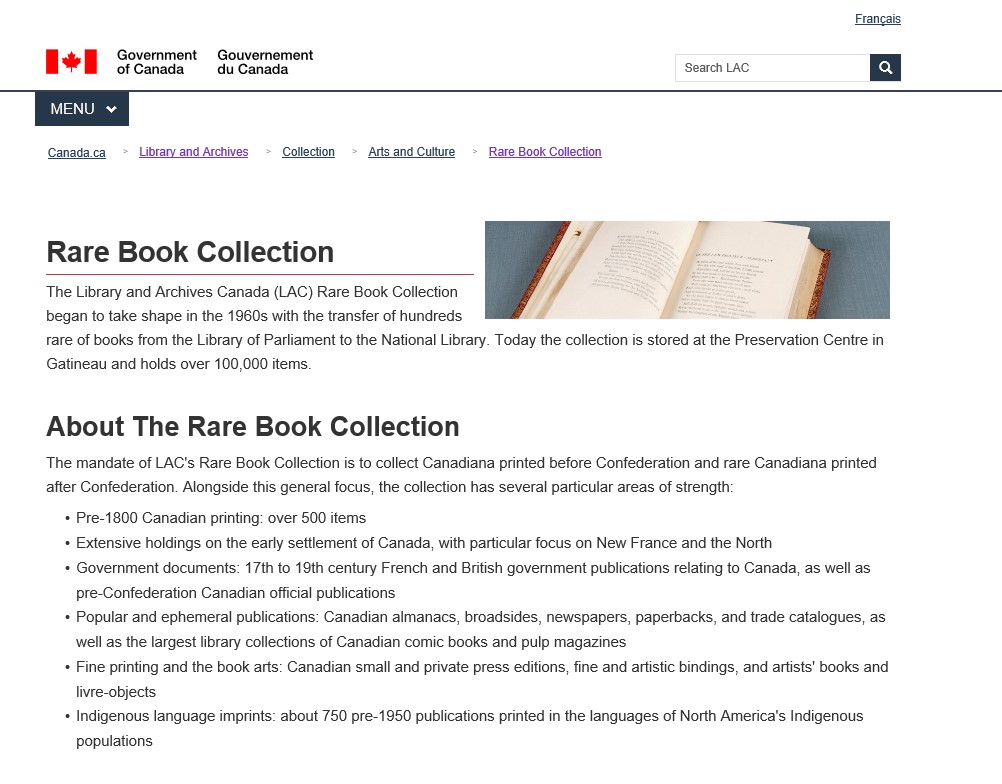
Screenshot of the Rare Book Collection webpage on the LAC website.

An example of the new template for subject guides for the new LAC website.

New structure

One of the biggest changes users will notice is the look and feel of the website. To make the information on the website more easily accessible to the public, we have developed a new structure for the website based on tasks, topics and themes that align with our users’ needs. In other words, we looked closely at how members of the public were using our existing website and what they were looking for (tasks). We then grouped those tasks into broad categories (topics). Finally, we grouped these topics into themes.

These themes are the basis for the website’s new structure and align with the Government of Canada’s design system. This system provides a more practical, consistent and reliable online experience for people who access Government of Canada digital services.

The first theme, Corporate, contains all of the institutional information relating to LAC. This includes information about our mandates, policies, initiatives and partners. This is where you will also find information about transparency at LAC and be able to read reports and plans about our activities.

The second theme, Services, is self-explanatory. It is where users can access our services or complete a task related to one of our programs. Under this theme, users will find information on how to visit us, how to order material, how to apply for ISBN numbers, how to make an ATIP request, and more. Also under this theme is information about the various services that we offer for gallery, library, archives and museum (GLAM) professionals, publishers, public servants, and Indigenous communities and individuals. This section will also contain information about our different funding programs.

Finally, there is the Collection theme. Our goal in rethinking how we present the Collection theme was to build user autonomy and discovery. This section will be home to all kinds of materials that will help Canadians access the documentary heritage under LAC’s care. In this section, you will find our databases, guides on researching various topics, publications, and podcast episodes, as well as a basic introduction to research. This section also includes many of LAC’s more interactive features, such as Co-Lab, our transcription program.

New navigation

One of the biggest challenge that users faced on our website was finding the information they were looking for. This was a problem particularly for material included under the Collection theme. Often, users would travel down rabbit holes and never be able to find their way back again. We have corrected this problem with a completely new navigational system based on tables. The new navigational table will include all pages listed by topic, sub-topic and type. For example, a web page on the First World War personnel files we have available would be appear as follows:

First World War Personnel Files – Military History – First World War (1914-1919) – subject guide

Even more important: this table will be filterable and searchable. This means users can easily see all of the resources that we have on a particular topic and find their way back without difficulty.

New content

The last exciting change to tell you about is the new content on our website. The existing site is enormous: it consists of 7,000 pages. Much of the information it contains is no longer up to current web and historical standards. We also know that many of the pages are hard to read, especially for beginners, and sometimes confusing. In preparation for our new website, we have systematically reviewed every single one of those 7,000 pages. Anything outdated or no longer up to current standards was archived (and will be available to the public), and the rest of the pages were reworked. All of the information on LAC’s new website is presented in plain language and is therefore clear and easy to understand. We hope this approach will attract an entire new wave of users interested in learning about Canada’s documentary heritage.

Since there is so much content, we focused on preparing material for the three most popular and most consulted topics for the launch: genealogy and family history, Indigenous history, and military history. Please note that, in the weeks and months ahead, we will add more material to these and other topics. We will be updating our material regularly in response to user feedback and to reflect the latest available information.

We’re so excited to show you all of the new material we’ve been working on! So, while this does mean that your URLs will change, we’re hoping that these changes will make your online experience at LAC a more positive one. Since this work is only beginning, the best is yet to come!

We look forward to your feedback. Please send us your comments and thoughts when we go live.


Andrea Eidinger is a team lead in the Online Experience Division at Library and Archives Canada.