Tips on How to Search for Companies’ Archival Records

Have you come upon an old stock certificate and wondered if the company is still in existence?

A very good starting point is the FP Survey, Predecessor & Defunct. This book provides information on changes to companies, as well as on those that are no longer in existence. It is also helpful in determining the date of incorporation of a company, the jurisdiction of incorporation (i.e. federal or provincial) and the status of a company (e.g. dissolved).

The actual stock certificate often indicates whether the company was incorporated under federal or provincial legislation.

If the company in question was incorporated under federal legislation, you can use Library and Archives Canada’s Archives Search to see if we have files on the company as part of the Corporations Branch (RG95) records. These records consist of files relating to companies which were incorporated, amalgamated, and dissolved between 1867 and 1973. It is possible to order copies of these files, but keep in mind that some of these can be voluminous.

You can also search Industry Canada’s Corporations Canada database for more recent company information. If your company was incorporated at the provincial level, Industry Canada provides a handy list of provincial registrars. A few jurisdictions offer free company databases (others may charge a fee) that provide information on the status of a company.

If your certificate is from a mining or oil company, you could ask your local library about these sources:

Canadian Mines Register of Dormant and Defunct Companies, compiled, printed and published by Northern Miner Press Limited. Toronto: Northern Miner Press, c1960. 419 p. AMICUS No. 1715558
Canadian Mines Register of Dormant and Defunct Companies. Supplement, compiled, printed and published by Northern Miner Press Limited. Toronto: Northern Miner Press, 1966- . ISSN 0068-9300. AMICUS No. 13231254
Canadian Mines Handbook. Toronto: Northern Miner Press. Maps. 19 cm. ISSN 0068-9289. AMICUS No. 89851
The Financial Post Survey of Mines. Toronto: Maclean-Hunter. ISSN 0071-5085. AMICUS No. 104992
The Financial Post Survey of Oils. Toronto: Maclean-Hunter. ISSN 0071-5093. AMICUS No. 34629
FP Survey, Mines & Energy. Toronto: Financial Post. ISSN 1486-4266. AMICUS No. 18927856

Good luck with your research!

How to find photographs that are not yet available online – part two

Our previous article “How to find photographs that are not yet available online—part one” explained the best-case scenario for finding photographs that are not yet available online. But what happens when things don’t go that smoothly?

What if I find items that are close but not what I want?

If there are items in your search results that aren’t quite what you’re looking for, don’t despair. It’s quite possible that we have what you want, but that it hasn’t been described yet. The items that have already been described offer you a useful clue as to where those non-described items might be.

First, note the fonds, collection, or accession where each item is from and look at the field labelled “extent.” How many other photographs make up that collection? Perhaps there are more images relating to your topic.

Does the item have:

– an item number?
– a particular photographer?
– certain keywords?

Use variations of those keywords, item number and photographer’s name to do other online searches in Archives Search. If those don’t yield any results, try the finding aid related to each item, either online or on paper. See “How to find photographs that are not yet available online—part one” for tips on using the finding aid.

What if the finding aid is not online or the finding aid is only available in paper?

If you find a fonds, collection, or accession that seems relevant to your research but that doesn’t have an electronic finding aid, look to see if it has a paper one. If it does, you can visit us at 395 Wellington Street in Ottawa, to have a closer look at it. If there is no reference to a paper finding aid, then you have to search through the boxes from that collection. If you cannot come to Ottawa, you can contact our reference staff for guidance, or you may wish to hire a freelance researcher.

With more than 25 million images, chances are we have your “perfect shot.” You just have to find it!

Questions or comments? We would love to hear from you!

Discover Finding Aids—Part Three: Searching within a Finding Aid

As we mentioned in our previous article “Discover Finding Aids – Part Two,” finding aids may be accessed through the hyperlinked number found in the “consists of” field in Archives Search. This link takes you to the next level down in the hierarchy, the lower-level descriptions.

Browsing through finding aids in this manner can be done quickly when there are a small number of lower-level descriptions. You can use the filters on the right-hand side of the search result list to sort by title or name, for example, or to limit the list to a particular decade.

However, for other finding aids, there may be thousands of lower-level descriptions and you won’t necessarily want to browse through them all.

Fortunately, help is at hand!

There is a way to keyword search only within these lower-level descriptions. This can be a very useful strategy when there are thousands of them.

First, go to the “finding aid” field description in Archives Search and jot down the finding aid number.

Screen capture of the finding aid section of a record description in Archives Search, identifying the electronic finding aid number.

Next, go to the Advanced Search page.

■ Select “finding aid number” from the drop-down menu and enter the finding aid number you wrote down in the first search box.
■ Enter your keyword search terms in the second search box.

Finally, click the “Submit” button.

Screen capture of the Archives Advanced Search box, indicating a finding aid number (24-60) and the keyword (Saskatoon).

Remember, this strategy is for searching finding aids that have been entered into Archives Search as lower-level descriptions in the “consists of” field. This strategy will not work for all finding aids.

Questions or comments? We would love to hear from you!

Reference Appointment by Skype

Did you know that we now use Skype to answer your reference questions? You can take advantage of the Skype reference appointment service when you need to meet with a specialist at Library and Archives Canada but cannot come to Ottawa, or when you wish to prepare for your visit ahead of time.

Through Skype, a reference specialist (archivist or librarian) will help you navigate our online tools, locate documents in our vast collection and clarify any conditions of access that may apply. You can follow along through a screen-sharing feature, share links through instant messaging and, of course, communicate with us by voice and video.

Before booking an appointment, make sure to consult our tips on how to get started with your research and other frequently asked questions. You can also peruse the Library and Archives Canada Blog to see if your question has already been answered.

To book your 30-minute Skype reference appointment, please contact us by telephone at 613-996-5115 (or toll free at 1-866-578-7777). You can also email us
by using our “Ask Us a Question” form. Please provide the following information:

  • your question
  • a preferred date and time (we are available Monday to Friday, between 9:00 a.m. and 4:30 p.m. Eastern Time)
  • that you would like a Skype appointment
  • your phone number (in case we have trouble reaching you by Skype or by email)
  • your Skype name

A reference specialist will contact you via Skype the day of your appointment.

If you are new to Skype, download the Freeware.

We look forward to meeting with you, wherever you may be!

Questions or comments? We would love to hear from you!

Queen Victoria’s Journals now available at 395 Wellington Street, Ottawa

At the age of 13, Queen Victoria became an avid journal writer when her mother gave her a diary to document an upcoming trip to Wales. Her last entry was written more than six decades later, on January 13, 1901, only nine days before her death.

This year, in honour of Queen Victoria’s birth (May 24, 1819) and the Diamond Jubilee of Queen Elizabeth II, all 141 journal volumes (comprised of 43,765 pages) have been digitized and are now available through a courtesy subscription obtained by Library and Archives  Canada (LAC), through The Royal Household, and with the assistance of ProQuest.

The project’s website says that “ As well as detailing household and family matters, the journals reflect affairs of state, describe meetings with statesmen and other eminent figures, and comment on the literature of the day. They represent a valuable primary source for scholars of nineteenth century British political and social history and for those working on gender and autobiographical writing.”

Not only have the diaries been digitized, they have been (and will continue to be) transcribed to allow for a keyword search. In fact, The Queen, as Head of State for Canada, did not leave us unmentioned. A keyword search for “canad*” (without the quotation marks) currently retrieves more than 150 results up to 1839!

As the project continues and more years are transcribed and become searchable, this resource will become more valuable.

To access the journals, use any of the public workstations located at 395 Wellington Street in Ottawa or our Wi-Fi connection and visit the website Queen Victoria’s Journals [http://www.queenvictoriasjournals.org/]. You may browse the journals by date or search for keywords.

Questions or comments? We would love to hear from you!

Tips and tricks on how to use a microform reader

Numerous documents belonging to Library and Archives Canada’s collection have been copied to microfiche and microfilm (some of which are available via AMICUS, and others via self-service at 395 Wellington Street, Ottawa). First-time researchers may find the equipment required to view this material somewhat confusing.

Therefore, we have prepared a quick list of Do’s and Don’ts to guide you in the proper use and handling of these machines so that your research may be profitable.

DO’s:

  • Prepare ahead of time for your visit and order material in advance, if necessary. To learn how, please consult our previous blog article: “The Top Five Things You Need to Know Before You Visit”.
  • Retrieve your microfilm from the Consultation Reading Room shelves, which are organized by the first letter of your surname, or retrieve self-serve microfilm from the Consultation Reading Room microfilm drawers.
  • Sign in with the Consultation staff in the Microfilm Reading Room for access to a microform reader.
  • Ask the Consultation Staff for assistance if you require help loading the microform onto the readers.
  • Bring your own flash drive or CD/DVD to save digital copies of the material. Printed copies may also be purchased using a copy card, available at the Consultation Office.
  • When making digital scans from microform, please complete a “photo permission” form (used primarily for statistical purposes).
  • Be aware that making copies from microform (either on paper or as digital images) can only be done during service hours.
  • Place the self-serve microfilm reels on the return shelf, located behind the Consultation staff’s desk (in the Microfilm Reading Room) when you are finished with them.
  • Return published microform (that is, the ones you have ordered via AMICUS), to the Published Material return shelf located near the Consultation Office.
  • Consult the Special Collections staff for access to the National Map Collection (NMC) microfiche.

DON’Ts:

  • Don’t place self-serve microfilm reels in your locker. When self-serve microfilm reels are not being used, they must be available for other clients.
  • Don’t disobey the Copyright Act by making digital copies of newspapers less than 100 years old. For more information, please consult the rules posted by each photocopier.
  • Don’t leave microfilm reels at your work station or on top of cabinets.

For more details, be sure to ask our on-site Consultation staff. They are ready to answer any additional questions you may have.

Happy research!

Questions or comments? We would love to hear from you!

What can you do at 395 Wellington Street before your appointment?

Our registration staff is often asked the following question:

“I have just registered for a user card at the registration desk on the main level (which is open daily from 9:00 a.m. to 4:00 p.m., Monday to Friday) but before I begin my research, I need help. I see that the orientation and genealogy service desks open at 10:00 a.m. I have some time until then and I am wondering if there is anything I can do while I wait?”

There are several things you can do while waiting to speak to one of our experts.

PUBLIC ROOMS

You may begin your day in our public rooms, on the second and third levels at 395 Wellington Street, Ottawa. These rooms have computer stations and Wi-Fi, so you can begin browsing our website or others’ sites. You may also wish to visit the cafeteria on the 5th floor where you can watch television while you enjoy a snack.

Opening Hours for the Cafeteria are Monday to Friday, 7:00 a.m. to 3:00 p.m.

REFERENCE SERVICES

You can also browse our collection of photographs, or look through historical atlases, city directories and phone books in our Reference Services Room, located on the second level. Additionally, in our Reference Collection Room, you will find parliamentary proceedings (Hansard), journals from the House of Commons, session papers up to 1925, annual federal government reports up to 1930 and original, as well as revised, statutes.

Opening Hours for the Reference Services Room are Monday to Friday, 9:00 a.m. to 8:00 p.m., Saturday/Sunday, 10:00 a.m. to 2:00 p.m.*

GENEALOGY AND FAMILY HISTORY

If you are coming to Library and Archives Canada to research your family history, head up to the third level and visit our Genealogy and Family History Room. As you enter the room, there are several Info-pages that may be of interest. These provide useful information to help you begin your research.

  • The Info-page called Genealogy Services – Book Collection explains how the books are arranged in the room. You can find books that have
    indexes to church records, cemeteries and other records.
  • The Info-page called Websites for Genealogy Research directs you to our Genealogy and Family History website. You can use the public computers or your
    laptop to search our databases in Ancestry Search or other websites.

Beside each of the computers in the Genealogy and Family History Room, you will find a sign that explains how you can log in to http://www.ancestryinstitution.com/, the free library edition of the popular http://www.ancestry.ca/ website.

If you are a beginner, you will find a display with pedigree charts that you can use to start recording the names of your ancestors.

Opening Hours for the Genealogy and Family History Room are Monday to Friday, 8:00 a.m. to 11:00 p.m., Saturday/Sunday, 10:00 a.m. to 6:00 p.m.*

(*) Consult our website for more details about opening and service hours.

Visit LAC’s website to find more information.

Questions or comments? We would love to hear from you!

Why Consult Newspapers on Microfilm?

We have already discussed how to find Canadian newspapers on microfilm; and you might have wondered why we have to turn to microfilm in the first place? Aren’t these newspapers available online?

The short answer is that only some of them are (*). Most newspaper editions available electronically for free are limited in their content, and the issues usually start only in the 1980s. If you are interested in full-page content and original layouts, or need to access older issues, some major dailies like the Globe and Mail, the Toronto Star and the Winnipeg Free Press offer historical versions in PDF format for a fee. As well, your local library may subscribe to a particular daily, or you may also purchase access yourself.

Another option is to access Library and Archives Canada’s newspapers on microfilm, an extensive collection that:

  • includes major newspapers, as well as local, labour, ethnic and student papers;
  • allows you to research aspects of newspaper publishing, such as design, layout and advertising, not contained in the electronic versions; and
  • provides access to content excluded in the electronic versions, including photographs, classifieds and obituaries.

Come visit us in Ottawa to consult these newspapers on microfilm and discover our collection, or contact us for more information.

* The following are examples of free digital newspaper collections:

Questions or comments? We would love to hear from you!

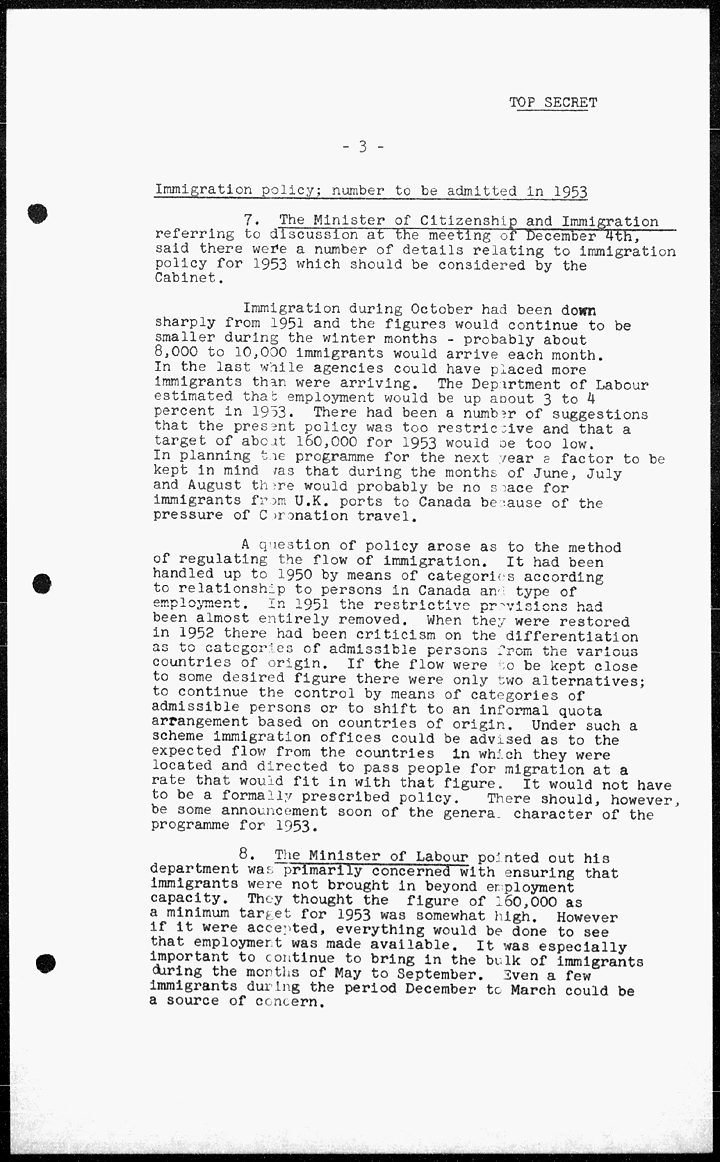
Cabinet Conclusions: A Window into Federal Policy

Are you curious about historic federal Cabinet discussions? Did you ever wonder what happened behind those closed doors? Find out more by using our Cabinet Conclusions database.

Here are some examples:

Cabinet Conclusions is a research tool that provides a record of the discussions that took place at federal Cabinet meetings for the years 1944–1976. Although they are not a verbatim transcript, the Cabinet Conclusions are the only official record of these Cabinet meetings.

For each meeting of Cabinet, the Clerk of the Privy Council prepared a summary of the discussions, a list of the officials who attended the meeting and an agenda. The summary can be very short or can cover several pages. The Cabinet Conclusions database does not include Cabinet Documents.

This research tool has a Search Help section that contains many useful search tips plus helpful background information on Cabinet and their records.

You may notice that the majority of the documents are in English, as this was the primary working language of the federal government at the time. For Cabinet Conclusions from 1944–1969, you can only search using English terms. For Cabinet Conclusions from 1970–1976, you can search using either French or English; however, the documents are usually only available in English.

Did you know?

  • The Privy Council Office only began to record Cabinet Conclusions in 1944. Prior to 1944, there were no formal records of Cabinet.
  • The Privy Council Office still holds the Cabinet Conclusions from 1977 onwards.

Questions or comments? We would love to hear from you!

How to Find Digitized Publications – Part II

In our post on “How to Find Digitized Publications”, we promised to  share more recommendations from our reference specialists about where to find digitized publications. The following sources point to a wealth of  publications from across Canada and from specific regions.

CANADA-WIDE SOURCES

Internet Archive – Text Archive [http://archive.org/details/texts]
The Internet Archive Text Archive contains a wide range of historical texts, academic books, government publications, fiction, popular books and children’s
books. The Internet Archive includes many digitized federal government and parliamentary publications from Library and Archives Canada’s collection.

  • Tip:
    Once you have found a work of interest, you can then use full-text searching options provided by the website.

Canadiana Discovery Portal [http://search.canadiana.ca/]
The Canadiana Discovery Portal allows you to search the digitized collections of libraries, archives and museums from across Canada. The Portal includes a
wide range of historical materials such as books, journals, newspapers, government documents, photographs, and maps.

Our Roots: Canada’s Local Histories Online [http://www.ourroots.ca/]
Our Roots is a wonderful resource for family history research. This extensive collection of digitized local histories, including historical publications,
from across the country permits full-text searches for family names, place names and events.

REGIONAL SOURCES

Bibliothèque et Archives nationales du Québec – Digital Collection
[http://www.banq.qc.ca/collections/collection_numerique/index.html?language_id=1]
Bibliothèque et Archives nationales du Québec offers extensive collections of digitized materials including newspapers, magazines, municipal directories,
books and musical scores, reference works, maps and plans, and images.

  • Tip:
    The Municipal Directories collection
    [http://www.banq.qc.ca/collections/collection_numerique/index.html?categorie=1]includes the Lovell’s Montréal directories starting in 1842.

Peel’s Prairie Provinces [http://peel.library.ualberta.ca/index.html]
Peel’s Prairie Provinces is an indispensable research resource on Western Canada and its history. It includes a bibliography with over 7000 fully searchable digitized books [http://peel.library.ualberta.ca/bibliography/], many dating back to the earliest days of exploration in the region.

Island Archives.ca at the University of Prince Edward Island [http://islandarchives.ca/]
A growing repository of records and images held in Prince Edward Island’s libraries and museums. Of particular interest are the digitized newspapers [http://islandarchives.ca/inewspapers] and maps [http://islandarchives.ca/imaps].

Questions or comments? We would love to hear from you!