Skip to primary content
Skip to secondary content

Library and Archives Canada Blog

This is the official blog of Library and Archives Canada (LAC).

Library and Archives Canada Blog

Main menu

  • Home
  • About the Blog
  • Français

Tag Archives: My Account

Track your archival orders!

Posted on October 1, 2024 by Library and Archives Canada Blog
Reply

Version française

By Yannick Lacroix

In 2024, Library and Archives Canada (LAC) launched Track my archival order (TMAO)—an online feature that allows you to track the status of your archival consultation orders at 395 Wellington Street, Ottawa. Currently only available at LAC’s Ottawa location, this feature offers real-time updates and details on your orders, providing greater autonomy and convenience as part of our ongoing commitment to improving your overall online experience.

How to use Track my archival order

To use TMAO, you need to register for a My account or sign into your existing one. Ensure you have a valid user card.
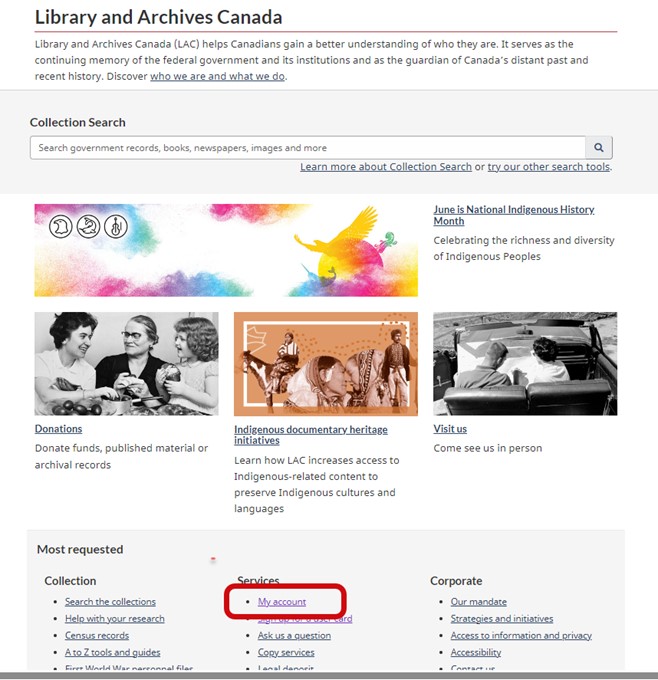
Screenshot of the homepage of the Library and Archives Canada website, with the My account hyperlink circled under the Services column.

Access My account through the Services section on LAC’s homepage. Source: Library and Archives Canada.

Once logged into your My account, click the Track my archival order action button in the My account dashboard or access it via the top-right dropdown menu.
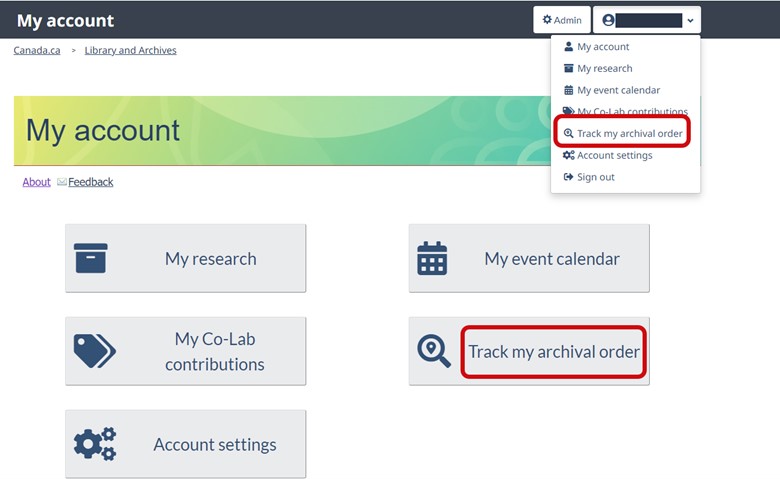
Screenshot of the My account webpage, with Track my archival order circled in the dropdown menu and in one of the five action tiles.

Access Track my archival order through the action tile or dropdown menu in the My account dashboard. Source: Library and Archives Canada.

Viewing your orders

After clicking on Track my archival order, you will see a list of your archival orders, which you can filter or narrow down by using keywords in the search bar or limiters in the left-hand column. You can also sort your orders by “newest,” “oldest,” and “due soon.”
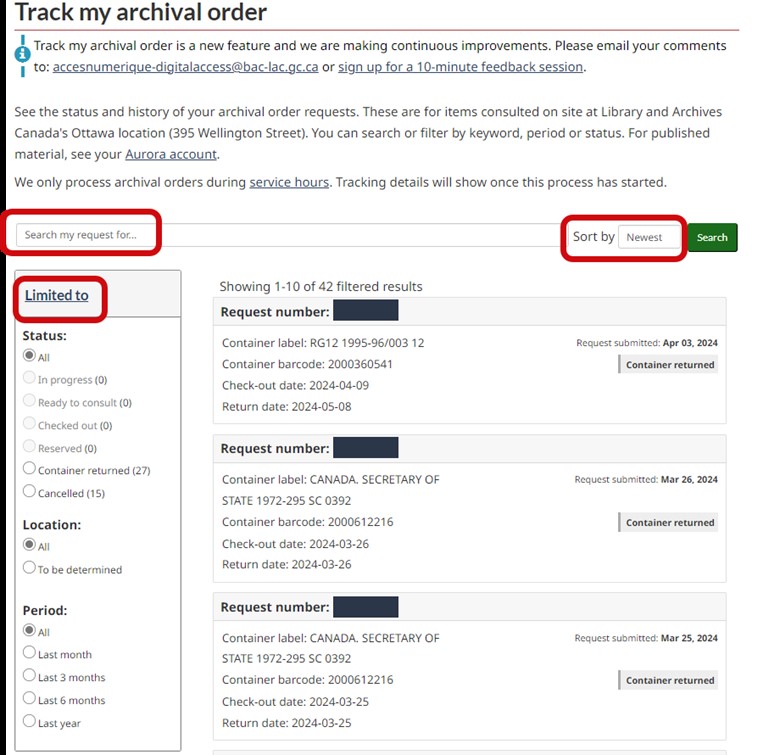
Screenshot of the Track my archival order webpage with the following three items circled: Search my request for; Sort by; Limited to.

Filter and narrow down your orders by using keywords in the search bar or limiters in the left-hand column. You can also sort your orders by “newest,” “oldest,” and “due soon.” Source: Library and Archives Canada.

Each order will provide details, such as request number; container label; container barcode; date of submitted request; status; check-out date; pickup location and due date.
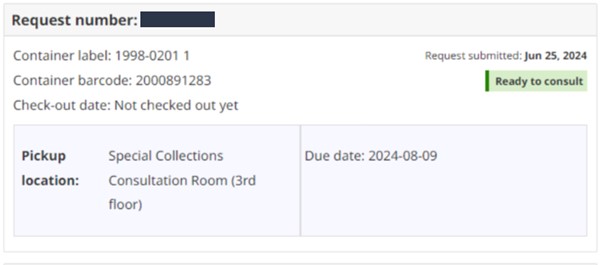
Screenshot of information pertaining to an archival order.

Example of the details of an archival order. Source: Library and Archives Canada.

Important note: To track your archival orders, the name and email address used for your My account must match those on your user card. Mismatched details will result in the error message “Your account is not connected to a user card.”

Screenshot of a warning message that appears when your My account is not connected to a user card.

The “Your account is not connected to a user card” message. Source: Library and Archives Canada.

If you receive the “Your account is not connected to a user card” message, verify the email address attached to your My account via Account settings.
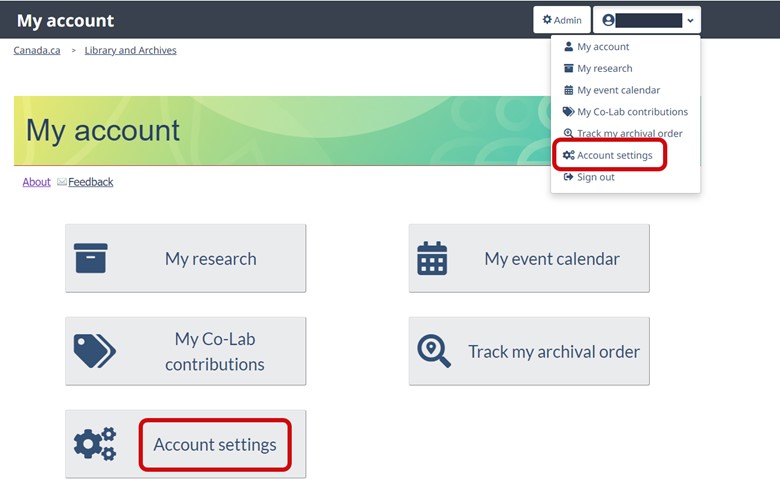
Screenshot of the My account webpage.

In the My account dashboard, you can access Account settings through the action tile or dropdown menu. Source: Library and Archives Canada.

To update the email address attached to your user card, click on Renew or Update Card on the Sign up for a user card webpage.
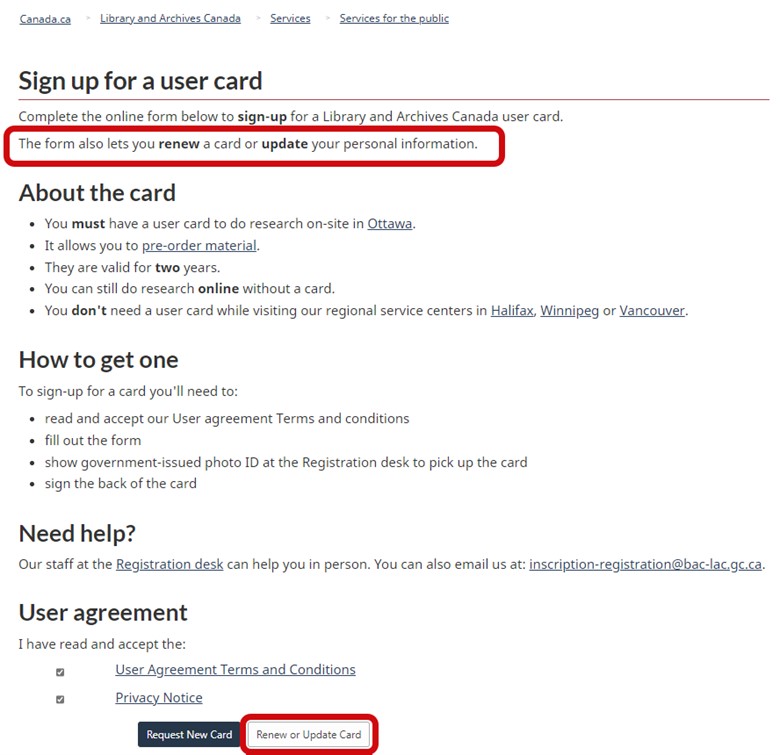
Screenshot of the Sign up for a user card webpage.

Form used to sign up for, renew or update a user card. Source: Library and Archives Canada.

Please note that LAC only processes archival orders during service hours and closer to the date of your visit, at which point you will be able to see the tracking details. Submitting the web retrieval form will not activate this feature.

We always aim to improve TMAO. If you have any suggestions or comments on how to enhance this feature, please email us at accesnumerique-digitalaccess@bac-lac.gc.ca.

Happy tracking!


Frequently asked questions

Why can’t I see my archival order in My account?

You may have used a different name or email address when registering for a user card. These details must be identical in both applications.

Why can’t I immediately track my order after submitting the Order archival material form?

Orders are only processed during service hours by LAC staff. You can track your orders once processing begins. Submitting the web retrieval form will not activate this feature.

What do the different statuses mean?

  • In process: A LAC staff member has started the retrieval process.
  • Ready to consult: The order has arrived at the specific delivery location.
  • Checked out: The containers from the order have been checked out to you and are in your possession.
  • Reserved: The container is checked out to another user, but a reserve has been placed for you. Please note that a request number will only be assigned once the box is made available.
  • Container returned: The container was returned by the client, checked back in by LAC staff, and returned to storage.
  • Cancelled: The order was cancelled.

Can TMAO track my reproduction request?

No, TMAO only tracks orders for items selected for on-site consultation at LAC’s Ottawa location at 395 Wellington Street.

What are the container label and barcode?

  • Container label: Associated with the reference numbers of the requested documents.
  • Container barcode: Unique to each container, it allows tracking of the box of records during the circulation process. It is also linked to the container’s permanent storage location.

Why can’t I track my archival order in LAC’s regional locations?

TMAO is currently linked to an application used only in the Ottawa region. We hope to expand this feature to other points of service in the future.


Yannick Lacroix is a product owner for Digital Access in the Access and Services Branch at Library and Archives Canada.

Share this:

  • Click to share on Facebook (Opens in new window) Facebook
  • Click to share on LinkedIn (Opens in new window) LinkedIn
  • Click to share on X (Opens in new window) X
  • Click to email a link to a friend (Opens in new window) Email
Like Loading...
Posted in Our Collection and Facilities | Tagged Archival boxes, archival consultation, archival containers, archival material, archival order, consultation, My Account, on-site archival loans, on-site retrieval, retrieval process, TMAO, track my archival order, User card, web retrieval | Leave a reply

Improving your online experience: how we are embracing user-centred design to build better online tools

Posted on November 2, 2022 by Library and Archives Canada Blog
11

Image of fingers on a keyboard

By Alexandra Haggert

The Digital Services Access Team

During the past two years at Library and Archives Canada (LAC), a new team has emerged, embracing a new way of working and plugging away at improvements that are much needed for the digital experience at LAC. The Digital Services Access Team is a multidisciplinary team comprising software developers, a product owner with extensive client-service experience at LAC, subject-matter experts in library and archival information, and user-experience researchers and designers.

The team follows an Agile project-management approach, like most software development teams in tech companies, and increasingly many teams in government, following the Government of Canada’s Digital Standards. This approach allows us to rapidly pivot to changing priorities and address new client needs as they arise. For the past two years, LAC has embraced an interdisciplinary and agile approach to improving the digital experience of our users. This allows us to continually improve our digital tools, which include Collection Search, My Account, My Research and the Co-Lab crowdsourcing platform.

What is user-centred design?

User experience (or UX for short) research and design is not a new field, and it is not a digital-only activity. The idea of consciously designing a tool so that the user has a positive experience of using it has been around for ages. Think about how a path is routed through a park. A path that takes the user from point A to B in the most comfortable way (for example, by providing shade and avoiding a large hill) is user-centred design.

In the digital era, the number of products and tools that people use every day, like websites and applications, has simply exploded. Each of these products and experiences must be consciously designed for usability, accessibility, enjoyment and ease. As UX design has grown as a field, so has the process that designers follow to quickly create products and make them better. The most important aspect of this process is that it is iterative; that is, it is continually repeated. Digital products must be continually re-evaluated and updated to adapt to ever-changing technology, client expectations, trends and more. The UX design process consists of five key stages: research, ideation, design, prototype and test.

A graphic showing five circles in varying colours with an image inside and a word below each one.

The five key stages of the UX design process

How we practice UX design at LAC: a case study

To understand how we are applying UX design practices at LAC, let us look at two products that were launched in the past year: My Account and My Research.

The team started by assessing client and business needs for online user accounts at LAC. In 2017, LAC first introduced user accounts so that clients could register online for in-person events. In 2018, we expanded that user account functionality when the Co-Lab crowdsourcing tool was released, which allowed clients to log in to contribute transcriptions (and more) to digitized archival material and keep track of the content they had worked on. We knew that the potential for what clients could do with online accounts was so much greater, and in the fall of 2020, we finally had a team that could use the design process to explore the potential.

The team held interviews with various stakeholders across LAC (such as the Reference team who help clients with research questions every day) and determined two key features that would bring value to clients:

  • a user profile menu where clients could update their personal information and access the various tools attached to their My Account; and
  • the ability to create personalized lists of records, saved from Collection Search.
An example of an early sketch in the design process for My Account. Credit: Alexandra Haggert

An example of an early sketch in the design process for My Account. Credit: Alexandra Haggert

After the design stage, the software developers on the team proceeded to prototype this product in our “dev environment”—a sort of staging ground for products that are still in construction mode. After many months of balancing this new product development with the maintenance needs of our existing applications, we had a working My Account system and began to test it.

Usability testing is where we learn so much about what works and what just does not work. Real clients are recruited to try a new product and are observed as they do so. Contrary to what some might think, we are not testing the client’s ability at all, we are testing the product itself. Is it intuitive, accessible, functional and easy to use? Where do we need to make changes? In usability testing for My Account, it was obvious right away that we had not made it easy for clients to sign up for a new account. The log-in window was front and centre, but for first-time users, it was confusing. So we went back to the drawing board and redesigned the My Account log-in page to have two clear options: log in as a previously registered user, or create a new account if it is your first time.

A Government of Canada web page with buttons for My Research, My Event Calendar, My Co-Lab Contributions and Account Settings.

A screenshot of the new sign-in page for LAC’s My Account

Once we had adjusted the redesign to reflect our test findings, we launched My Account and My Research in February 2022. These products now live on LAC’s website. If you are not already familiar with these new tools, please go and try them out, and then let us know what you think!

How you can get involved

Our Digital Services Access Team literally runs on your feedback and your service needs as LAC clients. We cannot get enough of your input!

Here is how you can help us to improve LAC’s online services:

  1. Send us your ideas, comments and feedback by email: recherchecollectionsqr-collectionsearchqa@bac-lac.gc.ca.
  2. Sign up to participate in usability testing opportunities when they become available.

Alexandra Haggert is a senior advisor in the User Experience and Engagement Sector at Library and Archives Canada.

Share this:

  • Click to share on Facebook (Opens in new window) Facebook
  • Click to share on LinkedIn (Opens in new window) LinkedIn
  • Click to share on X (Opens in new window) X
  • Click to email a link to a friend (Opens in new window) Email
Like Loading...
Posted in Our Collection and Facilities | Tagged Co-Lab, Collection Search, Digital Services Access Team, Government of Canada’s Digital Standards, My Account, My Research, testing, user experience, user-centred design, UX, Web_news | 11 Replies

New Blog Series: Improving your online experience

Posted on July 7, 2022 by Library and Archives Canada Blog
10

Hello to each of you, the clients and supporters of Library and Archives Canada (LAC).

As Director of the new Online Experience Division at LAC, I am happy to kick-start a blog series on changes to our online services. We have been working hard to refresh our web presence to make it easier for you to find information, use our services and access the collection online. You may have already noticed some new features on our site in the last few months, such as My Account and the improved digital publication deposit system for Canadian publishers and self-publishers. I am happy to report that we are launching our new website and application updates at the end of August 2022. This blog series will give you a preview of what’s to come and provide you with the opportunity to let us know what you think.

Teams from across LAC, led by our web team, have been working intensely over the past few years to design a new way to navigate and interact with LAC virtually. They have been reviewing thousands and thousands of web pages to ensure we are offering you the most relevant and up-to-date content. A  few weeks ago, LAC launched Vision 2030, our strategic plan for the way forward. With clear priorities and ambitious goals, Vision 2030 defines where we want to go, what we want to achieve and how we will get there over the next decade. A cornerstone of this vision is a user-centric website that invites current and new users to discover LAC and all it has to offer.

At the same time, we have been changing how we work so that we can be more responsive to you and add new features to our digital services more regularly. We have a multi-disciplinary team that plans its work in two-week iterations so it can easily adjust to solve problems or pivot to a new priority. This team, which includes IT developers, user-experience professionals and archival/library experts, is focused on ensuring that all our systems work together in an intuitive way. We have better integrated Co-lab with Collection Search and, more recently, added My Research, which allows you to create and save research lists. The team is currently working on a new interface to search all of the historic censuses at once, and we will share this with you soon.

A screen shot with numbered iterations on the left and items on the right.

A look behind the scenes—We are keeping track of all the improvements we’d like to make to our digital services in the form of “user stories.” We select a few to work on every two weeks.

We’ve also built a team focused on user-experience research and design to help us better anticipate your needs and create tools that are more intuitive to use. This includes incorporating new techniques into our planning, such as mapping the journey you need to take to get what you are looking for at LAC. Identifying the ‘pain points’ in that process helps us prioritize what to work on next. We’ve also been conducting usability research and testing with real clients. For example, to create the structure for the new website, we used a card-sorting exercise with our Youth Advisory Council to test whether our assumption on how to organize our material was right. We have also been gathering your feedback through an ongoing survey on our website. We will continue to do this and also use this blog series to seek your feedback.

A screen shot of the Services landing page of a website

A sneak peak at the new LAC website

We are excited that our new website will improve your digital experience with LAC and its collections, but we also know that we won’t get everything right immediately… and that’s okay. We will also still be missing key features that would make your online interactions with LAC better. That is why the August launch is just the beginning and we will continue to refine our tools, correct our mistakes and continue to add new content and features after the launch. Your feedback and engagement will be invaluable, so we welcome comments on the blog series and invite you to look out for other opportunities to help us test new products and features.

Stay tuned to this blog series over the coming weeks as my colleagues share more sneak peaks of what you can expect from the new website.


Karen Linauskas is the director of Online Experience Division at Library and Archives Canada.

Share this:

  • Click to share on Facebook (Opens in new window) Facebook
  • Click to share on LinkedIn (Opens in new window) LinkedIn
  • Click to share on X (Opens in new window) X
  • Click to email a link to a friend (Opens in new window) Email
Like Loading...
Posted in Our Collection and Facilities | Tagged Co-Lab, Collection Search, digital publication deposit system, My Account, Online Experience Division, online services, Vision 2030, Web_news, Youth Advisory Council | 10 Replies

Official website

  • Library and Archives Canada Website
  • Search all Government of Canada websites

Categories

  • Archived
  • Art
  • Biography and People
  • Census
  • Co-Lab
  • Consultation and Reference Services
  • Digitization
  • Discover/How to
  • Exhibitions
  • Exploration and settlement
  • Film, Video and Sound
  • Flickr
  • Genealogy & Family History
  • Geography
  • Immigration
  • Indigenous Resources
  • Library
  • Literature
  • Maps and Plans
  • Military Heritage
  • Music and Performing Arts
  • National Identity
  • Our Collection and Facilities
  • Photography
  • Podcasts
  • Politics and Government
  • Sports
  • What's New at LAC?

Tags

395 Wellington Aboriginal Amicus ancestors archives Art Black history Canada150 Canadian Expeditionary Force Canadian Expeditionary Forces CEF Census Conservation Databases digitization exhibition Exhibitions Family History First Nations First World War Flickr Genealogy Genealogy and Family History hockey home children images immigrants Immigration Indigenous Initiatives Inuit Military Music Métis photographs Photography podcast Project Naming published material Rare books Second World War Sports VC VC series Victoria Cross Vimy Ridge

Blog at WordPress.com.
  • Subscribe Subscribed
    • Library and Archives Canada Blog
    • Join 2,721 other subscribers
    • Already have a WordPress.com account? Log in now.
    • Library and Archives Canada Blog
    • Subscribe Subscribed
    • Sign up
    • Log in
    • Report this content
    • View site in Reader
    • Manage subscriptions
    • Collapse this bar
 

Loading Comments...
 

    %d