Census 1931, a peek into digitization

Version française

By Melissa Beckett and François Deslauriers

A glimpse into the microfilm room
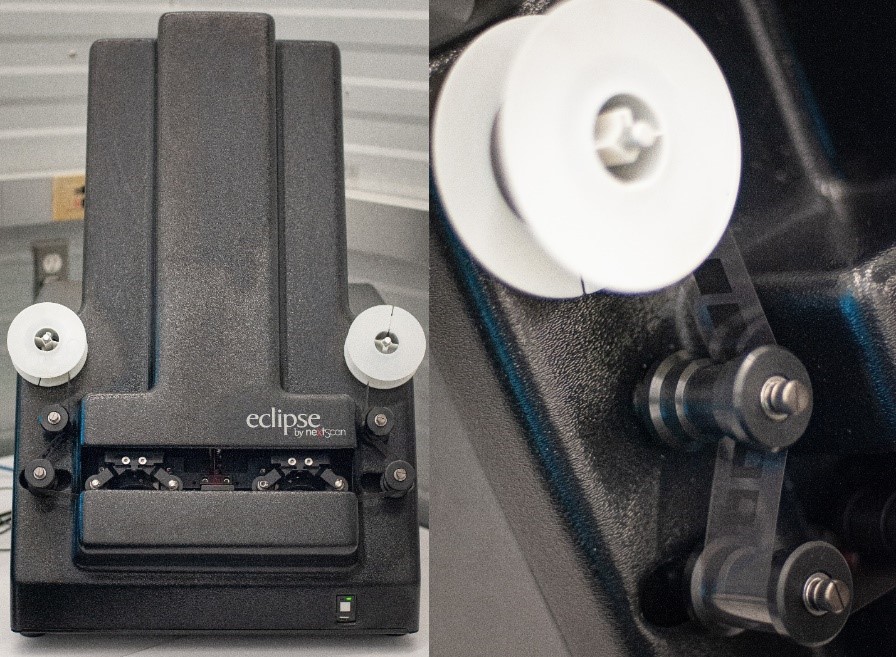
Two photographs of the Eclipse Rollfilm scanner by nextScan; on the left, a view showing the full scanner, and on the right, a close-up of the reel with some film threading past two of the rollers.

The Eclipse Rollfilm scanner by nextScan. Credit: François Deslauriers

In a dimly lit room, two imaging specialists sit in opposite corners. Each stares at their screen, where a series of images is constantly flowing from one side to the other. The rhythmic mechanical sounds of the microfilm scanners are occasionally interrupted by the high-pitched whine of the rewind, and a clunk as the last of the film winds back around its reel. With white-gloved hands, a specialist removes the reel from her scanner and places it back into its round metallic canister, which she returns to its archival box. She removes the next canister and slices around the taped edge with a pocket knife. She takes out the reel and mounts it on the scanner, winding the film around a series of rollers and then onto another plastic reel.

Meanwhile, the other specialist has stopped the process on his scanner. He needs to readjust some settings because the images in this section of the reel are much brighter than the earlier ones. He adjusts the exposure values in the software until he is satisfied with the appearance of the images in the preview window. The specialist scans a short section of film and opens it in the auditing software to double-check. He views one of the documents at full size, examining it closely. He then rewinds the film to the beginning, starting the scanning process all over again.

The project

For the Census 1931 project, the Digitization Services team digitized 187 microfilm reels, for a total of 234,678 images. At this time, by law, the reels were still subject to statistical secrecy, and a security procedure/protocol had to be followed. Only “deemed employees” who had taken the Statistics Canada Oath or Affirmation of Office and Secrecy were authorized to view the material. Reels were kept locked in a secure room, and all digitization was performed completely off-line.

The Census 1931 microfilm reels contain about 1200 images of census documents on each reel of 35-mm black-and-white polyester film. The imaging specialist digitizes from the print master, a copy of the archival master reel, in order to prevent any deterioration of the original.

Microfilm is an effective means of preserving information for long periods of time (reels can last for 500 years). Microfilm stores vast quantities of information in a small amount of space and supports preservation of the documents contained by removing the necessity of handling them. Digitizing microfilm reels provides another level of preservation as well as of accessibility to the public, who are then able to view the images from anywhere with an Internet connection.

The scanning process
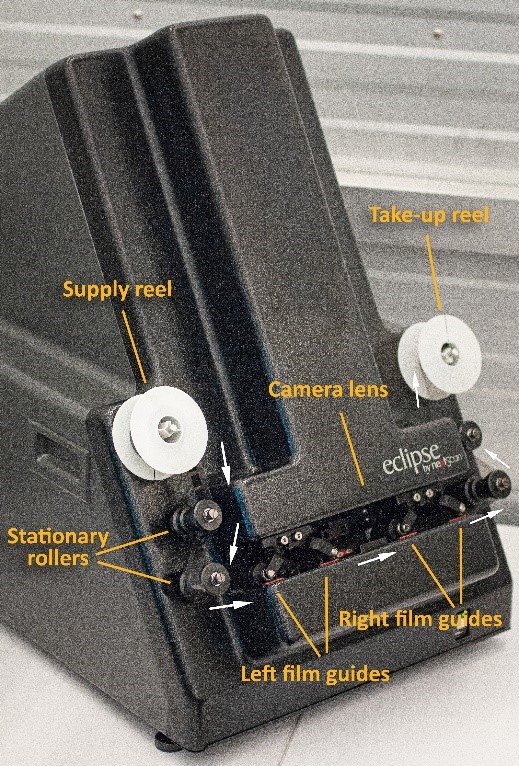
A photograph of the Eclipse Rollfilm scanner by nextScan, with labelled supply reel, stationary rollers, film guides, camera lens and take-up reel.

The Eclipse Rollfilm scanner by nextScan, with main components labelled. Credit: François Deslauriers

For this project, the digitization of the 1931 Census was performed with the use of the Eclipse Rollfilm scanner by nextScan, a dedicated microfilm scanner designed to digitize both 16-mm and 35-mm reels, in conjunction with an off-network computer. Film is threaded from the supply reel past stationary rollers and film guides to a take-up reel. The pinch rollers lower to hold the film in place on the film guides, automatically adjusting the tension of the film. The film is guided past a macro lens and digital sensor above, while lit from below through the film emulsion by a strip of red light. The reel is digitized as one long, uncompressed, grey-scale image file, referred to as a ribbon.

The imaging specialist handles the film using cotton gloves, being careful to touch the edges only. With the NextStarPLUS® Capture software, the reduction ratio (which is noted on the film and allows images to be reproduced at a 1:1 ratio) must be set, in addition to the resolution, film type (16-mm or 35-mm) and polarity (negative or positive). Before scanning, the specialist must also ensure that the exposure of the images is correct and that the lens is focused so the image is sharp.

With a live view on the screen, the specialist makes adjustments to the exposure and the focus. The specialist may zoom in on a focusing chart, as well as on the manufacturer’s information, printed along the edge of the film at regular intervals. The appearance of scratches or dust on the film can also be useful for determining sharpness. While the documents can be used to focus, this is only reliable if they were originally photographed with perfect sharpness.

A preview window during scanning allows the specialist to see when it is necessary to readjust settings over the course of scanning. When the documents were initially photographed, there may have been changes in lighting and exposure settings over the course of the reel. This results in some images appearing brighter or darker. The goal in digitizing each reel is to ensure that most of the documents will be legible, since adjustments in tonal values can only be made for the entire length of the film and not for each individual document.

After scanning is complete, the specialist rewinds the film and returns the reel to its canister.
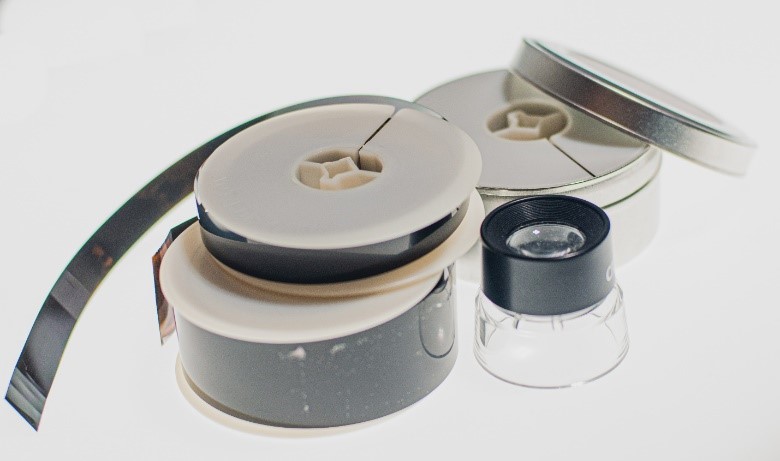
A photograph of a 16-mm microfilm reel stacked on top of a 35-mm microfilm reel, next to a loupe, in front of a 35-mm microfilm reel in its canister.

16-mm and 35-mm microfilm reels. Credit: François Deslauriers

The auditing process

After scanning the reels, the imaging specialist uses the NextStarPLUS® Auditor software to process the ribbons (the long image files associated with each reel). The software is used to detect and select each individual document within the ribbon so that they can be exported as separate image files. According to its detection settings, the software generates coloured rectangles around the documents. The specialist scrolls past rows of documents to select those that were not detected by the software and to adjust any rectangles that do not contain the whole document. On a second scroll through, a blackout setting changes the contents of the rectangles to black. This leaves any unselected white parts visible, making it easier to spot anything that may have been missed on the first pass, for additional quality control.

Each digitized document in the census is assigned an e-number, a unique identifying number used in this project to sort the images by place.

The images were initially exported as 10-megabyte TIFF files. TIFF is a “lossless” file format, meaning that there is no image compression. For the purposes of the project, JPEG derivatives (a “lossy” file format that requires less storage space and is more accessible) were created to aid in matching the digitized images to the census geographic districts and sub-districts, as well as for external partners working in artificial intelligence (AI). Information Technology created a script to efficiently turn the TIFF files into JPEGs.

Yesterday and tomorrow

Working in digitization at Library and Archives Canada means constantly improving processes and exploring new techniques and technology, to create the best-quality images possible. The 1931 Census was no different. As imaging specialists, we have been glad to play a small part in keeping Canada’s history alive and making it accessible to the public.


Melissa Beckett is an acting Imaging Specialist in the Digitization Services Division at Library and Archives Canada.

François Deslauriers is an acting Manager of Reprography in the Digitization Services Division at Library and Archives Canada.

Improving your online experience: How we are making digital legal deposit better for publishers, LAC and you

Version française

Image of fingers on a keyboard

By Arlene Whetter

Along with highly visible improvements to its public website and research tools, LAC is making changes behind the scenes to how it adds new digital publications to its library collection. One example is our new submission methods for digital legal deposit. Legal deposit is the way that we build our library collection of published materials. Federal laws in place since 1953 require Canadian publishers to send copies of every publication to the national library. Over the years, the law has changed to include not only printed books but also new formats entering the publishing landscape. Digital publications have been subject to legal deposit since 2007.

No one is ever surprised to hear that the growth in the number of digital publications submitted for legal deposit since 2007 has been extraordinary. Not only is almost every trade publication now available in both print and digital versions, but the number of self-publishers submitting materials for legal deposit has grown exponentially as well. The ease of online publishing and distribution via self-publishing platforms, such as Amazon, allows many more Canadians to join the ranks of published authors. To cope with the influx, we’ve developed more efficient ways to collect and process digital publications.

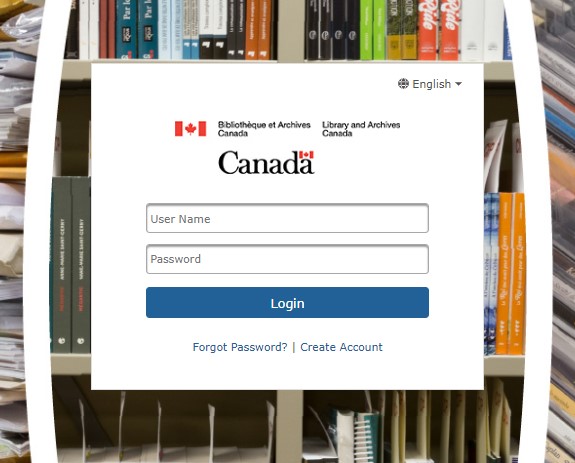
A white box with fields for User Name and Password and a login button. In the background are book spines of various colours.

A screen shot of the new digital legal deposit login page

Our new submission methods

In December 2021, LAC launched new online forms for low-volume submissions of digital publications, such as those from self-publishers who may have only a few books to submit. We’ll soon launch a new way for large commercial publishers to submit publications in high volumes, with hundreds of titles in a single submission. The new methods are convenient for publishers, and they allow us to acquire and catalogue the publications more quickly. The short-term impact for Canadians is that LAC can acquire more digital publications and provide timely access to them. The long-term impact is that we preserve more of Canada’s digital publishing heritage for the generations to come. We offer two types of public access: open or restricted. Access to trade publications and publications for sale is always restricted. These publications can be viewed onsite at LAC for research purposes.

To reach our goal of acquiring and providing access to more digital publications, we took a two-pronged approach. We needed to revise the submission methods and data requirements for publishers, and we needed to revise the internal processing methods for LAC staff. Our old methods, from publishers’ perspective, were simple: they transferred the files to us, either through bulk file transfer or by attaching files to a short online form. We did not request additional data such as lists of titles, author names, and ISBNs, because our systems were not set up to automatically transfer this data to our own records. After receiving the files, LAC staff would manually type all of the data into our library catalogue. We decided to develop new workflows that would take advantage of publisher-supplied data to give us a head start with catalogue records and reduce internal processing times.

Different methods for different publishers

We knew from the start of our planning process that a one-size-fits-all submission method would not work for Canadian publishers. We acquire digital publications from self-publishers, from associations, from government bodies, and of course from large commercial publishers and producers. Each type of publisher has specific needs. For example, commercial publishers create records about their publications in the form of ONIX data, the industry standard used to share information between publishers and booksellers. Since commercial publishers already have this rich source of data, it makes sense for LAC to build a workflow that can accept ONIX data and use it to create the first draft of a library catalogue record. We’re currently in the midst of the final testing for this workflow. We plan to launch it with trade publishers in 2023.

Another submission method is the one we’ve already launched for self-publishers, associations, and smaller publishers who typically do not use ONIX data. Since the efficiency of our new workflows depends on the receipt of additional data from publishers along with their publication files, we needed to develop a way for these publishers to provide the data via forms on our website. Filling in forms for every title is more time-consuming for publishers than our previous method. As a result, we thoroughly assessed our decisions at every step in the design process, looking for a happy medium that would not place a burden on publishers but would still allow us to create efficient workflows.

Spreadsheet showing columns for publisher, city, province or territory abbreviation, year of publication, language of publication, International Standard Book Number (ISBN), International Standard Music Number (ISMN) and series title.

Snapshot of spreadsheet with a red box when an error is made – a QA feature

We set up quality control functionality in the forms where possible, using drop-down boxes and rules to highlight data entry errors. We included instructions and examples that explain what information to include and how to format it. Once we had prototype forms ready for testing, we sent them out to variety of publishers and received a lot of useful feedback, which we incorporated before launching the forms last year.

Striking a balance

In the early stages of the project, we researched the methods used for digital legal deposit at every other national library we could find. We contacted many international librarians to find out more and to learn how, with hindsight, they might have done things differently. We found ideas to inspire us and gained confidence in our planned approaches. The British Library shared the data specifications for its ONIX workflow, which have been very helpful as a foundation for our own workflow.

In general, other national libraries use a variety of approaches. At one end of the spectrum, we found some that accept files without any data as we did with our previous workflow. At the other end, we found libraries with deposit requirements sufficiently complex that private companies have built niche businesses to help publishers meet their legal deposit obligations. At LAC, we set out to strike a balance between these two approaches.

The introduction of these new digital legal deposit workflows at LAC is a big improvement behind the scenes. There is no doubt that we are now more efficient. In addition, we are able to acquire and provide access to more digital material than before. We continuously monitor how publishers are using the forms and make improvements based on our experience and publisher feedback. We’re always happy to hear from publishers and encourage you to reach out to us at depotlegalnumerique-digitallegaldeposit@bac-lac.gc.ca


Arlene Whetter is the supervisor of the Digital Legal Deposit team at Library and Archives Canada.

Why Consult Newspapers on Microfilm?

We have already discussed how to find Canadian newspapers on microfilm; and you might have wondered why we have to turn to microfilm in the first place? Aren’t these newspapers available online?

The short answer is that only some of them are (*). Most newspaper editions available electronically for free are limited in their content, and the issues usually start only in the 1980s. If you are interested in full-page content and original layouts, or need to access older issues, some major dailies like the Globe and Mail, the Toronto Star and the Winnipeg Free Press offer historical versions in PDF format for a fee. As well, your local library may subscribe to a particular daily, or you may also purchase access yourself.

Another option is to access Library and Archives Canada’s newspapers on microfilm, an extensive collection that:

  • includes major newspapers, as well as local, labour, ethnic and student papers;
  • allows you to research aspects of newspaper publishing, such as design, layout and advertising, not contained in the electronic versions; and
  • provides access to content excluded in the electronic versions, including photographs, classifieds and obituaries.

Come visit us in Ottawa to consult these newspapers on microfilm and discover our collection, or contact us for more information.

* The following are examples of free digital newspaper collections:

Questions or comments? We would love to hear from you!

Cabinet Conclusions: A Window into Federal Policy

Are you curious about historic federal Cabinet discussions? Did you ever wonder what happened behind those closed doors? Find out more by using our Cabinet Conclusions database.

Here are some examples:

Cabinet Conclusions is a research tool that provides a record of the discussions that took place at federal Cabinet meetings for the years 1944–1976. Although they are not a verbatim transcript, the Cabinet Conclusions are the only official record of these Cabinet meetings.

For each meeting of Cabinet, the Clerk of the Privy Council prepared a summary of the discussions, a list of the officials who attended the meeting and an agenda. The summary can be very short or can cover several pages. The Cabinet Conclusions database does not include Cabinet Documents.

This research tool has a Search Help section that contains many useful search tips plus helpful background information on Cabinet and their records.

You may notice that the majority of the documents are in English, as this was the primary working language of the federal government at the time. For Cabinet Conclusions from 1944–1969, you can only search using English terms. For Cabinet Conclusions from 1970–1976, you can search using either French or English; however, the documents are usually only available in English.

Did you know?

  • The Privy Council Office only began to record Cabinet Conclusions in 1944. Prior to 1944, there were no formal records of Cabinet.
  • The Privy Council Office still holds the Cabinet Conclusions from 1977 onwards.

Questions or comments? We would love to hear from you!

How to Find Digitized Publications – Part II

In our post on “How to Find Digitized Publications”, we promised to  share more recommendations from our reference specialists about where to find digitized publications. The following sources point to a wealth of  publications from across Canada and from specific regions.

CANADA-WIDE SOURCES

Internet Archive – Text Archive [http://archive.org/details/texts]
The Internet Archive Text Archive contains a wide range of historical texts, academic books, government publications, fiction, popular books and children’s
books. The Internet Archive includes many digitized federal government and parliamentary publications from Library and Archives Canada’s collection.

  • Tip:
    Once you have found a work of interest, you can then use full-text searching options provided by the website.

Canadiana Discovery Portal [http://search.canadiana.ca/]
The Canadiana Discovery Portal allows you to search the digitized collections of libraries, archives and museums from across Canada. The Portal includes a
wide range of historical materials such as books, journals, newspapers, government documents, photographs, and maps.

Our Roots: Canada’s Local Histories Online [http://www.ourroots.ca/]
Our Roots is a wonderful resource for family history research. This extensive collection of digitized local histories, including historical publications,
from across the country permits full-text searches for family names, place names and events.

REGIONAL SOURCES

Bibliothèque et Archives nationales du Québec – Digital Collection
[http://www.banq.qc.ca/collections/collection_numerique/index.html?language_id=1]
Bibliothèque et Archives nationales du Québec offers extensive collections of digitized materials including newspapers, magazines, municipal directories,
books and musical scores, reference works, maps and plans, and images.

  • Tip:
    The Municipal Directories collection
    [http://www.banq.qc.ca/collections/collection_numerique/index.html?categorie=1]includes the Lovell’s Montréal directories starting in 1842.

Peel’s Prairie Provinces [http://peel.library.ualberta.ca/index.html]
Peel’s Prairie Provinces is an indispensable research resource on Western Canada and its history. It includes a bibliography with over 7000 fully searchable digitized books [http://peel.library.ualberta.ca/bibliography/], many dating back to the earliest days of exploration in the region.

Island Archives.ca at the University of Prince Edward Island [http://islandarchives.ca/]
A growing repository of records and images held in Prince Edward Island’s libraries and museums. Of particular interest are the digitized newspapers [http://islandarchives.ca/inewspapers] and maps [http://islandarchives.ca/imaps].

Questions or comments? We would love to hear from you!

New Digitized Reels: Border Entry Records

We are pleased to announce that you can now access 121,302 new images of immigration records on our website, with the Microform Digitization research tool.

Before 1908, people were able to move freely across the border from the United States into Canada. Beginning in that year, entry ports were established along the border. From 1908 to 1918, and from 1925 to 1935, border entry records were compiled in a list format to record the names of immigrants.

By providing these images online, Library and Archives Canada (LAC) is now offering all immigration records containing nominal information for immigrants from 1865 to 1935 in its custody. Discover these valuable resources with the Microform Digitization research tool, which allows you to browse, page by page, the border entry records.

For more information on recent announcements at LAC, visit “News”.

How to Find Digitized Publications

Now, more than ever, you can access print publications online. The trick is finding them. So, our reference specialists at Library and Archives Canada (LAC) offer the following tips to help you discover published works that are just a click away!

Library Search

Get started with our Library Search tool. Just follow these easy steps to find Canadian published materials digitized by LAC and other libraries across the country.

  1. Go the Library Advanced Search screen.
  2. Select the Title Keyword search option and enter keywords from the title of a book that interests you.
  3. Search in: Canadian Libraries.
  4. From the Format dropdown menu, select Online.
  5. Click the Submit button. This will open a new page with your search results.
  6. Select any relevant search result to access the full record with the description of the book.
  7. Click on the link in the description to access the digitized version of the book.

Early Canadiana Online

Our reference specialists recommend the Early Canadiana Online (ECO) [www.eco.canadiana.ca/?usrlang=en] digital library as the go-to source for 19th century published material. Offering a vast online collection, ECO not only lets you search for specific works, but it also allows full-text searching. Some of the digitized content in ECO is only available to subscribing institutions, so ask your local library.

Here are a few tips for searching the ECO collection:

  1. Use the Advanced Search screen to narrow your search.
  2. To find specific titles, select the title option from the Search in drop-down menu.
  3. From the Find documents matching drop-down menu, select the option all terms in close proximity when searching the full-text of the digital library. This ensures that your search terms occur close together, not on separate pages of the full document.

Our next post on How to Find Digitized Publications will cover the following sources:

Also, stay tuned to find out about some regional digitization initiatives that provide access to provincial and local materials.

Do you have any sources you like to use? If so, share them with us!

Questions or comments? We would love to hear from you!

How to Order Digitized Reproductions and Help Build the Digital Collection

Do you need a reproduction of an item in the Library and Archives Canada (LAC) collection? If so, follow the easy instructions and useful tips below to make the process a seamless one!

  1. Go to our online Order Form.
  2. Read the instructions carefully and select all mandatory options. (If you select purposes other than research or private study under Declaration of Use, your request may be subject to copyright restrictions.)
  3. Select Continue to go to the next page.
  4. Choose the reproduction format you wish to receive. (Each of the six format options varies in price.)
  5. Fill out the Item Description section, providing the reference number and all relevant information for the material you wish to have reproduced. When you are done, select the Add to shopping cart button to review your order.
  6. Select the Checkout button once you have all the items you need. This will bring you to the Client Information/Method of Shipping and Billing page where you can finalize your order.
  7. You can submit your order online or print the form and send it by fax or mail. Select the option you prefer at the end of the form.

Tips:

    • Provide your contact information when you finalize your order so LAC staff can inform you of any restrictions.
    • Visit our Price List and Service Standards to find out how much your order will cost and when you can expect to receive it.
    • Choose the Photocopy or PDF option to receive a reproduction of a textual document; choose the Digital Copy option for copies of photographs and larger items.
  • Access Examples of Reference Numbers to find out what information we need to process your order.
  • Complete the form with as much detail and information as you can to help us process your order quickly and easily.

Tidbit:

Did you know that you can help make a broader range of LAC holdings available to others? You can do this by choosing the PDF option (either the URL link by email or the CD) when you order a complete file—for example, a soldier’s file from the First World War. Your images can then be repurposed for the LAC website, whenever permissible. Help us build the LAC digital collection; the URL link will save you money on shipping fees too!

Questions or comments? We would love to hear from you!